
Copilot connectors (formerly Graph connectors) the 100+ you get out of the box
Copilot is only as useful as the content it can reach. Out of the box, it reaches your Microsoft 365 — SharePoint, mail, Teams. But most organisations’ knowledge does not all live in Microsoft 365. It is in ServiceNow, in Salesforce, in a Confluence wiki, on a file share, in some homegrown app the finance team relies on. Copilot connectors are how you bring that content in. And before you assume that means a development project: Microsoft ships more than a hundred of them, ready to configure without a line of code.
First, the name changed
What used to be called Microsoft Graph connectors are now Microsoft 365 Copilot connectors. Same technology, a new label that reflects where the content ends up. A connector defines a connection to an external system and brings its content into Microsoft 365, so that Copilot and Microsoft Search can reason over it alongside your SharePoint sites and email.
Two kinds: synced and federated
There are two flavours, and the difference matters.
Synced connectors crawl the source and index its content into Microsoft Graph, so it becomes part of your search index. They are organisation-wide and configured by an admin.
Federated connectors do not index anything. They fetch results live from the source at query time, over the Model Context Protocol, which suits sensitive or fast-changing data you would rather not copy into Microsoft 365. They are per-user, and the user authenticates to the source themselves.
Most of the classic “get our other system into Copilot” scenarios are synced. That is the model the rest of this covers.
The hundred-plus you already have
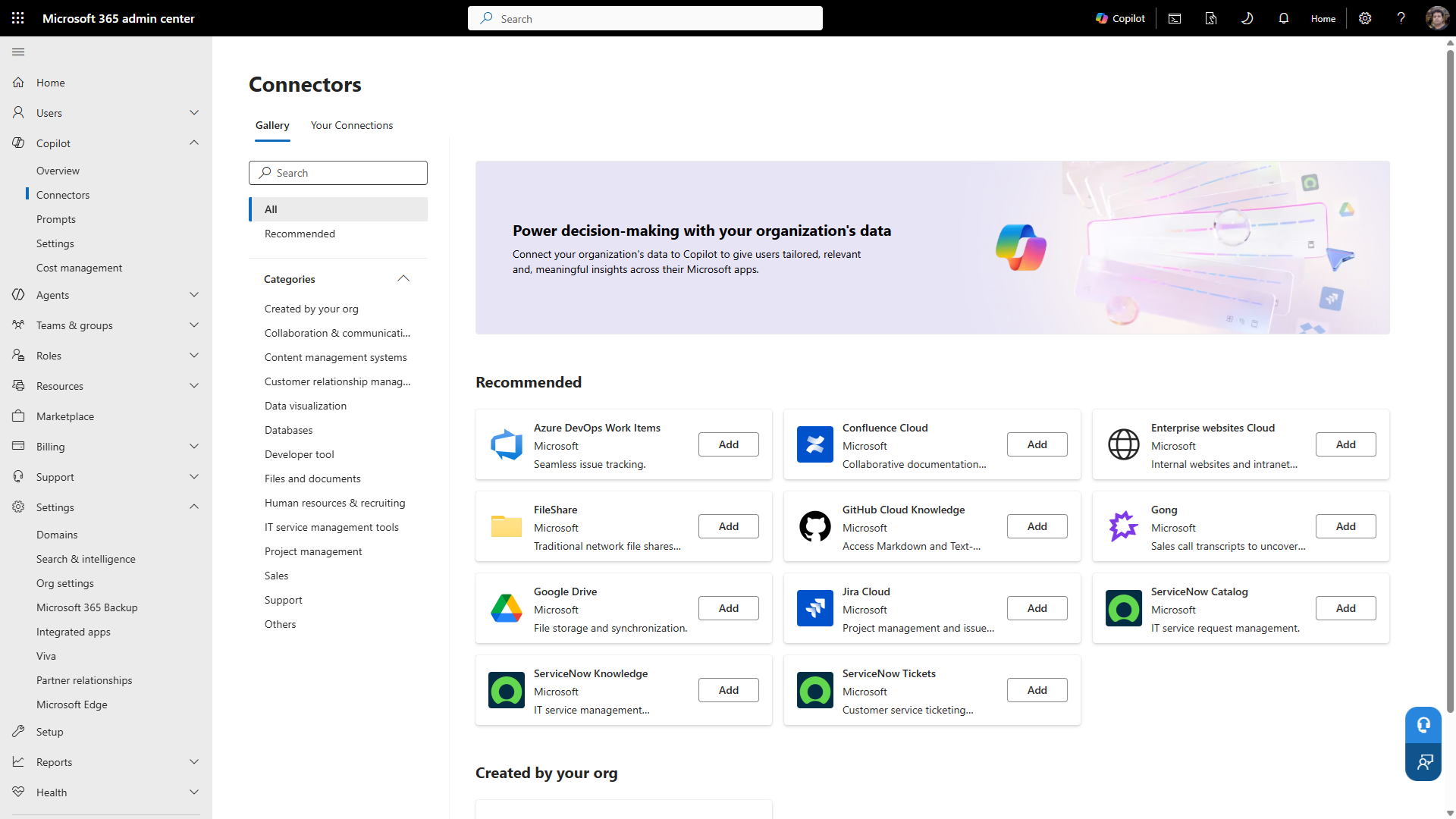
Here is the part that saves you a development budget. Microsoft and its partners ship over a hundred prebuilt connectors, and between them they cover most of what a typical organisation runs:
- Files and content: Box, Dropbox, Google Drive, Confluence, MediaWiki, network file shares
- Enterprise apps and databases: Salesforce, ServiceNow, Dynamics 365, SAP, SQL and Oracle databases, Azure services
- And a long tail beyond: Workday, Zendesk, Jira, and more
To use one, you pick it in the Microsoft 365 admin center, give it credentials and a bit of configuration, and Microsoft’s connector service handles the crawling and indexing from there. No schema to define, no code to write, no app registration to build. Microsoft and its certified partners maintain and update them. You will need the AI administrator role to set them up.
How a synced connector actually works
Under the hood, a synced connector ingests each item into the Microsoft Graph index with three things attached: the content, its metadata such as title and URL, and — the important one — an access control list.
That ACL is what makes the whole thing safe. Copilot and Search only ever show a connector item to users who have permission to it in the source system. The connector also keeps itself current, periodically checking the source for new, changed and deleted content on a schedule you control. The indexing pipeline runs in Microsoft’s cloud, and the content is stored in your own tenant.
Where the content shows up
Once a connector is running, its content appears in the places your users already work:
- In Copilot Chat, where a question like “summarise the Contoso deal” can pull the answer from a connected Salesforce record and cite it, without the user ever opening Salesforce.
- In Copilot Search, which includes connector content automatically, with no extra setup.
- In Microsoft Search across Office.com, SharePoint, Outlook, Teams and work Bing, where external results appear alongside internal ones, each labelled with its source.
- As a knowledge source for custom agents you build in Copilot Studio.
The point of a connector is that the knowledge stops being trapped in a system nobody thinks to open.
When out of the box is not enough
Microsoft’s own rule of thumb is the right one: use a prebuilt connector whenever one exists, and reserve custom development for the sources that genuinely need it.
A custom connector is a real project. A developer defines a schema, registers an app in Microsoft Entra ID, and writes the code to pull content from the source and push it into the Graph. That is the right call for a homegrown or unusual system with no prebuilt option — I have built several for exactly that reason. But if your source is one of the hundred-plus already in the gallery, building your own is effort you do not need to spend. For on-premises sources, there is a middle path: the Microsoft Graph connector agent indexes local content without exposing it to the internet.
The permissions catch
One thing worth flagging, because it is the same lesson as everywhere else Copilot reaches. A connector respects the source’s permissions through that per-item ACL, which is exactly what you want. But it also faithfully reproduces the source’s oversharing. If a Confluence space or a file share is open to everyone, the connector will index it that way, and Copilot will surface it to everyone — just as it does for an overshared SharePoint site. The connector is not the exposure. The source’s permissions are. Get those right before you index, not after.
So before you assume that getting your other systems into Copilot means a development budget, open the connectors gallery in the admin center and look. There is a good chance the system you had in mind is already there, waiting for credentials and a crawl schedule. Start with what is out of the box, and build custom only for what genuinely is not.

2 Comments
Comments are closed.