
Copilot agent sprawl is site sprawl’s smarter cousin
Anyone in your organisation can build a Copilot agent this afternoon. A few clicks in the agent builder, no code, and in most tenants no approval step standing in the way. The uncomfortable part is the next sentence. Most admins cannot tell you how many already exist.
That is the next governance problem, and it is the old one wearing a new face.
Here is why it matters. An agent is only ever as safe as the access underneath it. It grounds on your content through the same permission-trimmed retrieval that Microsoft 365 Copilot uses. So point a helpful helpdesk agent at an overshared SharePoint site, and it will cheerfully answer from whatever that site overshares. The agent did not create the exposure. It gave it a friendly conversational front door.
Now multiply that by every well-meaning employee who spins up an agent on content they can already see. You get agent sprawl. Dozens of small Copilots, each inheriting the same permission mess, each a fresh surface on the same underlying oversharing.
This is why “should we allow agents” is the wrong first question, and I will say it plainly. Most organisations already allow them, by default. The question that actually matters is whether you know how many you have, and what they can reach.
The controls exist
The better news is that Microsoft has built the governance surface, even if nobody has opened it yet.
In the Microsoft 365 admin center, the Agents page (part of the Copilot Control System) lists the agents in your tenant and lets you approve, block, remove, assign and deploy them. Under Agents > Settings, User access controls who in your organisation can use agents, and Allowed agent types controls which kinds appear in the store: agents built by Microsoft, agents built by your own organisation, and agents built by external publishers.
Custom engine agents, the ones built in Copilot Studio, are governed separately through the Power Platform admin center, where agent development settings and governance controls sit alongside your environments and DLP policies.
For the SharePoint side, the Insights report on agents in SharePoint lists recently created agents across your SharePoint and OneDrive sites, including the sites with the highest number of agents. That last part is the one to watch. It tells you where the sprawl is concentrating. There is also a Copilot agents usage report in the admin center that spans declarative, SharePoint and custom engine agents.
Controls only help if someone is watching
Here is the catch with all of it. A settings page you never open governs nothing. The reason agent sprawl feels new is that the access it rides on is not new at all. It is the same oversharing you have been meaning to clean up: the sites shared with Everyone, and the anyone-with-the-link grants left live from a project that ended two years ago.
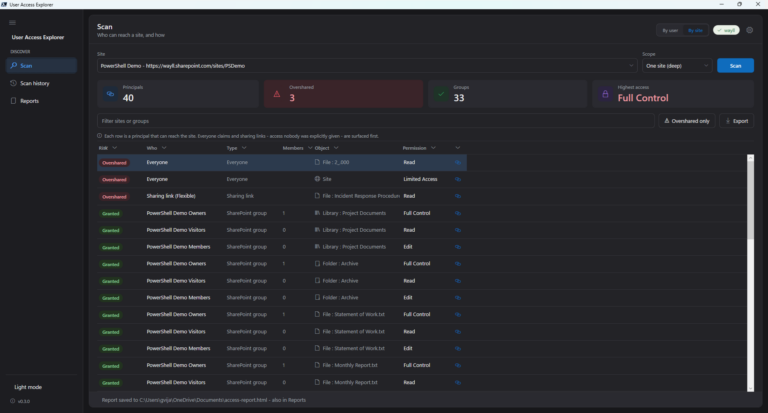
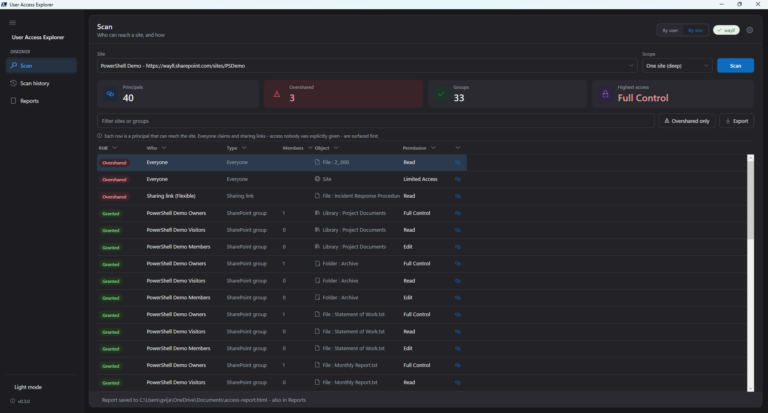
Blocking a few agents does not fix that. It treats the symptom. An agent that inherits a clean permission model is a convenience. An agent that inherits a messy one is a search engine for your worst-shared content. So the honest starting point is not the agent settings page at all. It is finding out who can reach what. I wrote up reporting who can reach a site for exactly this.
If you are still working out the difference between a declarative agent and a custom engine one, I covered which is which, and which you actually need, separately.
Agent sprawl is site sprawl’s smarter cousin. Get ahead of it before it gets ahead of you.


2 Comments
Comments are closed.