Microsoft 365 Copilot vs Glean: the permissions question that actually decides it
Sure enough, somebody in your Microsoft environment eventually asks the question: do we simply have to choose between Glean and enabling Copilot? In all likelihood, what’s going on behind the scenes here is that one of them has to be better for corporate data security than the other. And, that’s an entirely reasonable question. The problem is, the right answer isn’t to be found in the decks presented by either of the two vendors.
Both of them are enterprise AI, which will give you answers to questions, based on your corporate data. Microsoft 365 Copilot does that inside Microsoft 365, leveraging your SharePoint, OneDrive, Exchange and Teams, and beyond, via Graph connectors. Glean does it throughout the entire application ecosystem, based on Google Drive, Slack, Salesforce, Jira, Confluence, Microsoft 365 and everything else, via its own connectors. One lives deep in one environment. The other operates broadly across many environments. We’ll need to remember this.
The thing they do identically
Then there is what people misunderstand about it. Both Glean and Copilot are permission aware and do not create any access.
Glean reads the permission matrix – the access control list – of everything it connects to and makes sense of what it finds by filtering to what you have access to personally. In their own words, if you do not have access to a file in Google Drive or a channel in Slack, it does not even appear in your Glean search results.
It is the same for Copilot inside of Microsoft 365. Each and every prompt works in your security context. If you cannot access a file in SharePoint, Copilot won’t summarize it for you. It does nothing but make accessible what you could access anyway.
So when it comes to the actual issue that keeps people up at night: “Will it give access to something to someone who is not supposed to see it”, both say: no.
The mess both of them inherit
And that is where the twist is in both cases neither card starts with. Permission-aware goes both ways. It reproduces your permission scheme to perfection.
A file made accessible to Everyone really will be made accessible to everyone by both assistants, because everyone truly has the right to access it. A folder opened three years ago by an employee leaving the company is free for grabs once someone asks a question in a certain way. Neither assistant exposes more than necessary. You have already done it. The assistant just makes what was hidden behind thousands of folders immediately available at anyone’s fingertips.
That is how the switch from one assistant to another solves absolutely nothing regarding security. An overshared SharePoint reveals itself through Copilot. Overshared Drive and Slack reveal themselves through Glean. The assistant is never cleaner than the permissions it sits on top of.
So what actually decides it
With safety on equal footing, there are only two variables left, and these are what matter.
Reach. Copilot integrates deeply and natively within Microsoft 365; so, if that is the ecosystem in which your knowledge exists, it doesn’t require any additional setup to be effective, with the Graph connectors giving you reach beyond them. The entire value proposition of Glean lies in reach: if the knowledge in your organisation is spread out over half a dozen SaaS applications, Glean has been designed to index all of it in one central place. It goes without saying: the former situation calls for Copilot, while the latter – for Glean. Not safety, but this is what actually matters.
Governance of it. When you have Copilot, you aren’t getting an assistant. You are getting an ecosystem that comes with governance tools required to deal with all the oversharing that Copilot brings about: Purview for data loss prevention and sensitivity labels, SharePoint Advanced Management for Restricted Content Discovery, Restricted Access Control, and the Data Access Governance reports. Glean comes with its approach: single-tenant connectors, up-to-date permissions across all of the apps, least privilege policy implementation, and zero retention agreement with the model providers so that your knowledge won’t be used for training. Both options are valid. They are just valid differently.
The honest verdict
It’s not “which is safer,” since on the question that counts, they are the same. It is “whose knowledge is really in the house, and how much Microsoft governance do you already have.” An organization based around Microsoft tools, which already has Purview and SharePoint Advanced Management, has got the set and depth that it takes. An organization with knowledge scattered around non-Microsoft SaaS has a real case for the breadth of Glean.
But the choice that lies behind both and drives the actual safety of either is the same whether it’s the Microsoft logo or someone else’s. They bring to light information people are already accessing. So the job isn’t picking the assistant. The job is making sure there is no embarrassment waiting for it, once it is turned on.
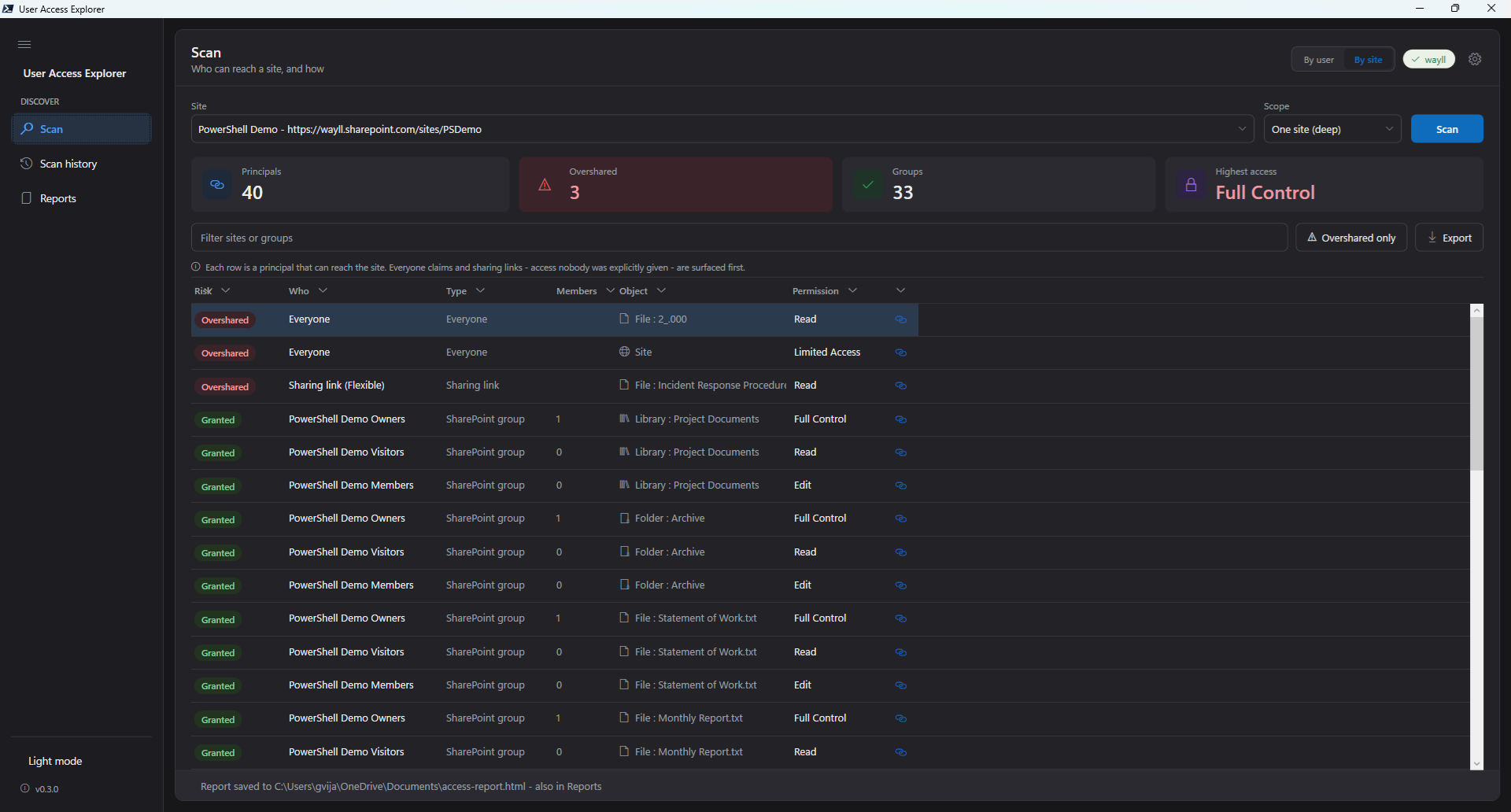
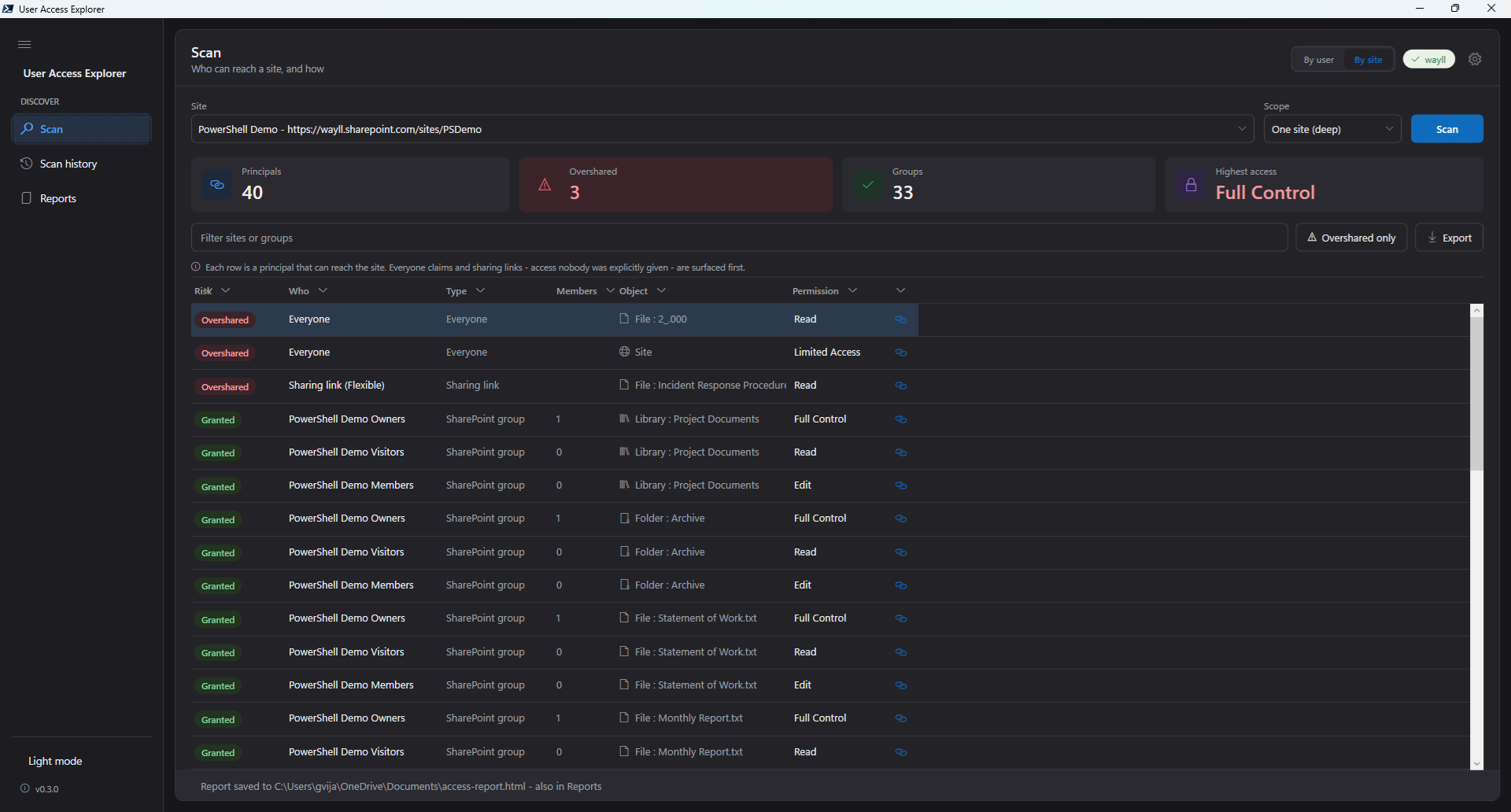
This, the question of who can access what at the moment, in your Microsoft environment – that’s what User Access Explorer is built to show you. Whatever assistant you go with, do this first.
One Comment
Comments are closed.