If you are looking to copy list items from one Sharepoint site to another programmatically, please have a look at this post
In this post you will learn how to copy list items from one list to another using Sharepoint Designer workflow, for this you need basically two lists, Source List and Destination List
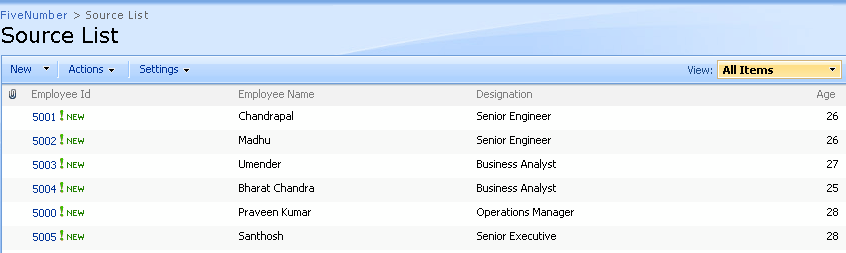
Source List

Copy Item Workflow – Sharepoint Designer

Source List
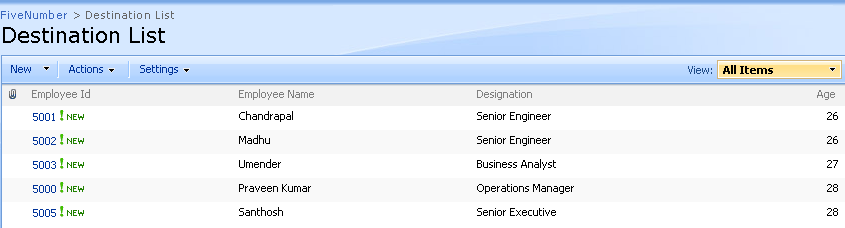
Destination List
Create two custom lists:
Source List (below are columns and column types)
Employee Id (Single line of text)
Employee Name (Single line of text)
Designation (Single line of text)
Age (Single line of text)
Destination List (below are columns and column types)
Employee Id (Single line of text)
Employee Name (Single line of text)
Designation (Single line of text)
Age (Single line of text)
After creating the two lists:
- Open site in Sharepoint Designer 2007
- Click File > New > Workflow, which opens Workflow Designer window
- Enter the name of the workflow in the appropriate box
- Select the list name (Source List) from ‘what sharepoint list should this workflow be attached to‘ dropdownlist
- After selecting the list from the dropdownlist, select at least on checkbox from the following:’Allow this workflow to be started manually from an item‘
‘Automatically start this workflow when a new item is created‘
‘Automatically start this workflow whenever an item is changed‘
- Click Next
- Enter the Step Name in the appropraite box
- Click on the Conditions buttons and select the ‘Compare Source List item‘
- Click on the field and select the field name (Age), like that give the condition like if source list greater than Age
- Now, click on the Actions button to perform what action to be done if the condition is satisfied
- Select Copy list item
- Select the current list (Source list) and then select the Destination list (where to copy the item)
- Again, Click on the Actions button and select ‘stop the workflow‘ and enter the message
Now, try to add the item in the source list (Employee Id, Employee Name, Designation, Age)
If the age is greater than 25 then the row will get update in the destination list too.

when using ‘copy list item’ in designer, 2 fields (identical names, types, descriptions and settings) will not copy to another list. All other fields do. Any thoughts…. things to look for?
This is great! How can this be done with two lists on two different sites?
@ Andrew: Thanks for looking into the post, if you want to copy list items from one site to different site you can accomplish this programmatically, I have already posted an article on this, please have a look into http://www.fivenumber.com/copy-sharepoint-list-items-from-one-site-to-another-programmatically/
H Vijay, can we apply this work flow to all of the items with in a sharepoint Library like a loop through all the items even if the item is a result of past upload.
@Naresh: Work flow starts when an item is created, try the programmatic way explained on the link http://www.fivenumber.com/copy-sharepoint-list-items-from-one-site-to-another-programmatically/ for copying the past created items, also I have posted a comment on updating created, modified and modified by columns too
Thanks for looking into the post
I’m trying to copy an infopath form from the source list to a destination list but I need to have security imposed so that everyone can access the source list but not the destination list. My SPD workflow fails due to users not having permissions to the destination list. Any thoughts on temporarily allowing access to copy using SPD then removing the access? Using InfoPath 2007 and MOSS 2007
hi..but what if we modify the list..does the destination one gets updated..if not..how do we work around this
@ Cally: The above workflow only starts when the item is added and after the conditions satisfies, you have modify the workflow to get update the already existing items
I have been unable to get the workflow to update the already existing item within the list (ie if the source list is edited) it sees it as a new item, so the destination list is popultaed with numerous versions of the same thing i have tried everything i can think of to get this work but cant seem to figure it out. Do you have any ideas bar unticking the new item work flow box or viewing as xml and changing the overwrite function from false to true?
Hi Vijai,
Thanks for the great Info. This made my work much easier.. 🙂 but still am facing a problem in this.? how can i get teh date difference in this. I don’t find any arithematic involved here. Actually my aim is to copy items to another list, where for items that are created before 3 months. The base list should have only 3 months’ data and the backup list should have all those created before 3 months. Hence i need to perform a datediff where i dont find any option to do.?
want to copy a document from one document library to another document library in different site not in same site.
Have you noticed that the Age (Single line of text) column should in fact be a Number column in order to get the “is greater then” option for the operant?
I am facing the same problem as that of Tendayi. When i update an existing item in the source list, the workflow copies the item to the destination list as a new item. As result, i have multiple items in the destination list.
I have tried adding a step to delete the item from destination list. but it fails when i try adding a new item to the source list, as, the workflow does not find a similar item to delete in the destination list. also, there is NO such condition available, to check if the source item exists in destination, and then delete the destination item.
I need to update the item in destination list through workflow, when the item in source list is updated.
Note: both the lists have exactly same columns.
If I have an announcement list which receives list items via email and have attachments how do I move the attachments as well. I have everything in the list moving to another list except attachments
Hi
Your post is very helpful.
But here my requirement is whenever a person Add Items in source list they must be copied to destination list no conditions will be there. Whatever is added it must go to destination list. How can I do that in sharepoint designer without coding.
Thanking You,
Bharath.
To those of you (and more realistically any new visitors) who have permission issues when copying list items. The solution to this problem is to use an “Impersonation Step” for the copying. In SharePoint Designer, you will see Impersonation Step in the insert portion of the ribbon. Any commands put into the impersonation step will be ran with the permissions of the workflow author. Hopefully, this helps.
Re: David McVey
I also had the same issue… I wanted to have users submit a form to a document library, but i didn’t want other users to be able to read all the submissions. I couldn’t find an OOB solution to a “Write Only” document library, so I opted to use two libraries. Users submit their documents (InfoPath forms) to a library where they have Contribute access. I created a workflow where the form is copied to the 2nd (secured) document library, then the original is deleted from the 1st library.
The solution worked great for me, but the workflow would error out when other users tried to run it. I’m not sure why, since the workflow should be using a system account to do the move. My workaround for now is to enclose the workflow steps inside an impersonation step.
Hi,
I need to move more picutures form one picture library to another picture library in certain date. if this is possible in SharePoint Designer 2010 absolutly fine. please help me to solve this issue. Thanks in advance.
Will it work for look columns?
Will it works for lookup columns ?