Copy Sharepoint list items from one site to another programmatically
In my earlier post, I have show you how to Copy items from one list to another, using Sharepoint designer workflow now we learn how to copy list items from one Sharepoint site to another site programmatically
Before executing the code I have created two Sharepoint sites, first is http://fivenumber:5/ and the second http://fivenumber:50/
I have also created custom list in each site, Source List in site http://fivenumber:5/ and Desitination List in http://fivenumber:50/
Here in this scenario I have chosen Console Application template because it doens’t contains any input fields to show as webpart and also to avoid GAC registration, safe controls etc., I felt it will be easy to execute the code in Console.


using System;
using System.Collections.Generic;
using System.Text;

using Microsoft.SharePoint;

namespace CopyListItems
{
    class Program
    {
        static void Main(string[] args)
        {
            try
            {
                SPSite mySourceSite = new SPSite("http://fivenumber:5/");
                SPWeb mySourceWeb = mySourceSite.OpenWeb();
                SPList mySourceList = mySourceWeb.Lists["Source List"];
                SPQuery mySourceListQuery = new SPQuery();
                mySourceListQuery.Query = "" +
                                "" +
                                "" +
                                "" +
                                "";
                SPListItemCollection mySourceItemColl = mySourceList.GetItems(mySourceListQuery);
                int count = 0;
                foreach (SPListItem mySourceListItem in mySourceItemColl)
                {
                    string SourceEmpId = mySourceListItem["Employee Id"].ToString();
                    string SourceEmpName = mySourceListItem["Employee Name"].ToString();
                    string SourceDesig = mySourceListItem["Designation"].ToString();
                    string SourceAge = mySourceListItem["Age"].ToString();

                    SPSite myDestinationSite = new SPSite("http://fivenumber:50");
                    SPWeb myDestinationWeb = myDestinationSite.OpenWeb();
                    SPList myDestinationList = myDestinationWeb.Lists["Destination List"];
                    SPListItem myDestinationListItem = myDestinationList.Items.Add();

                    myDestinationListItem["Employee Id"] = SourceEmpId;
                    myDestinationListItem["Employee Name"] = SourceEmpName;
                    myDestinationListItem["Designation"] = SourceDesig;
                    myDestinationListItem["Age"] = SourceAge;
                    myDestinationWeb.AllowUnsafeUpdates = true;
                    myDestinationListItem.Update();
                    myDestinationWeb.AllowUnsafeUpdates = false;
                    count++;
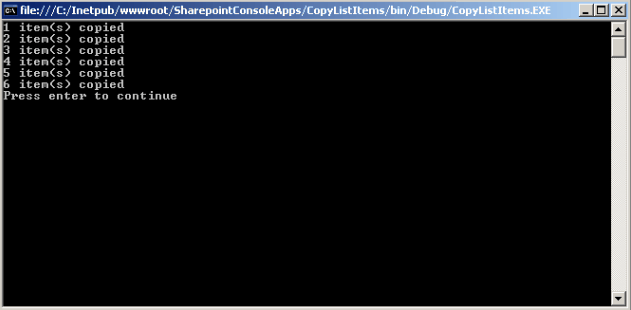
                    Console.WriteLine(count+" item(s) copied");
                }
                Console.WriteLine("Press enter to continue");
                Console.ReadLine();
            }
            catch (Exception ex)
            {
                Console.Write(ex);
                Console.WriteLine("Press enter to continue");
                Console.ReadLine();
            }
        }
    }
}
If you have Lookup column in your Source List and want to copy the same data in to Destination List, you have to create an instance for SPFieldLookupValue class like below…..
Let’s suppose ‘Employee Name’ column is lookup field, comment or remove the line # 29 in the above code and replace with below code snippet
SPFieldLookupValue mySourceLookupEmpName = new SPFieldLookupValue(mySourceListItem["Employee Name"].ToString());
string SourceEmpName = mySourceLookupEmpName.LookupId.ToString();
Hi Vijay,
nice work.. do you know how can we keep the created,modified date and modified by for the item we are copying in the destination list.
@Naresh: Try the below code to update the created, modifed date, modified by fields
mySPListItem[“Created”] = new DateTime(2010, 1, 18); // you can set your own date
mySPListItem[“Modified”] = System.DateTime.Now; // you can set your own date
mySPListItem[“Modified By”] = “domain\accountname”; // you can set your account name
mySPListItem.UpdateOverwriteVersion(); //Updates the item without creating another version of the item
Thanks Vijay, I am working for a similar solution where I have a Document library with more than 2000 documents. and user has the ability to mention the Expiration of each document by mentioning the date in a custom created datefield column. if for any reason user does not mention any expiration date with in that custom column system should set the expiration date based on the last modified date which is (modified date+365). I have tried to implement this formula in a console application and set the expiration date. which is check the custom expiration column, if there is a date field set the date as Expiration date otherwise set expiration date as ( Modified + 365) which i was able to set successfully without modifying the Modified or create fields. and probem starts for me when copying those documents which are expired into a seprate Archve library. my first attempt to cpoy the the expired items is creating a custom expiration forumula which was same as the logic that i mentioned to check the custom date field and set the expiration date and as you know that we have Information maagement policy and where we implement this custom expiration formula. I have crated a workflow in Designer to copy the documents into the Archive Document Library up on successfull execution of the custom expiration formula. after running this expiration i can see only 95 documents copied over to the Archive Library and there are 500 more documents remained in the original document library whose modified date satisfied my condition that it has not been touched since 1 year and which needs to be expired or archived acording to my requirement. so i am thinking it is better to implemen the copy logic in console application itself so that i dont have to deal with the expiration formula.. in doing so your code is exactly what i need but have a different if condition.. here is my if condition based up on that condition copy should occur..
if (System.DateTime.Compare(docexpirationdate, todayminusthreesixtyfive) < 0)
{}
where docexpiration date is set based up on the following code
for (int i = 0; i < list.ItemCount; i++)
{
SPListItem item = list.Items[i];
object expDate = item["Document Expiration Date"];
if (expDate != null)
{
Expiration.SetExpirationDateForItem(item, Convert.ToDateTime(expDate), false);
}
else if (expDate == null)
{
object defaultExp = item["Last_x0020_Modified"];
expDate = Convert.ToDateTime(defaultExp).AddDays(365);
Expiration.SetExpirationDateForItem(item, Convert.ToDateTime(expDate), false);
}
and todayminus365 is the date field that returns an year old date.
so up on this condition i want to execute the copy operation.. my first question is do i need to implement spquery as the way you did. can i use the same logic that you used to copy.
its a long mesage but sorry i have to start from the begining…
how to copy the list from one site to another site using Feature
Hi
How to move data from One Sharepoint site to external Sharepoint site using out of box web service
Hi,
This code works OK if both SourceSite and TargetSite are on the same farm and same credentials are being used.
But what if I am running this code on my TargetSite Server and what If my SourceSite is sitting on a different farm(requires different credentials). Which modification I need to do?
Thank you
I want transfer document form SPList from one site to Other site. Both the sites are in different Farm. How I can achieve this?. For Eg. one document is kept in this site “http://server1/list” now Want to transfer to Second site i.e. on “http://server2/list”. Appriciate Your Help Thanks
Hi,Your document is of gr8 help.But i want to know that if i am using my first list on a web page where i am filtering my results with the help of dropdown list.i want those filtered results to be moved to second list.How to do that.Plz suggest.
@ Ankit: You can use CAML query, then based on filter you can move/copy only those particular items
@Hi,
If I want to Manage the permission using Sharepoint object model then ? while transferring from same to site list to same another list. Thanks
@ Datta: What permissions you want to manage exactly? do you want to set list permissions while copying items from one list to another?
Please provide more information, thanks
Thanks for your reply. Item level persmission. Suppose user has set permission as Reader to one documen & Contributor for another document using out of box SP Manage Permsiion Menu. Then same Persimmision should assign to document/Item which transfer to other document list. I wrote sample code snippest but It throws Error 4 me.
site.WebApplication.FormDigestSettings.Enabled = false;
web.AllowUnsafeUpdates = true;
SPUser user = web.CurrentUser;
SPRoleDefinition RoleDefinitionRdr = web.RoleDefinitions.GetByType(SPRoleType.Reader);
SPRoleAssignment roleAssignment = new SPRoleAssignment((SPPrincipal)user);
roleAssignment.RoleDefinitionBindings.Add(RoleDefinitionRdr);
Then MyQuestionListItem.Roleassignment.Add(roleAssignment)
but It throwing Error Message like –
1. The security validation for this page is invalid & another on is
2. Operation is not valid due to the current state of the object
If you have pointer then please let me know how I can achieve this.
Also Please let me know If you have know something about my query dated “Datta Time April 16, 2010 at 12:34 pm”
Once agian Thanks
I have a list that I need to be used in different sites. For instance the list is on site A and then I have site B that needs to use the same list. If i do a copy list item like in this post is there a way to keep the list on Site B updated when list A gets updated.
Hi Vijai,
Thanks for the Great work. Your work gave me an idea of how to move list items. But this code will move all the contents present in the list to another list whith the same type. But how to move the attachements of each row to the destination list.?
@ Meenakshi Sundaram: Thanks for looking into the post, please follow the post on how to copying attachment from one list to another http://www.sharepoint-tips.com/2008/11/how-to-copy-attachments-from-one-list.html
@ Rebecca: Better to hook with a event handler for the list on Site A, whenever item is added you will be able to add the same item in list on Site B
Good Luck 🙂
Hi Vijai,
Thanks for the update. I have small doubt. Do you have any pages in you for writing an event handler and how to debug it. because it is becoming tedious. So request you give any references in the steps for writing an Event Handler.
Instead of using event handler use SPD workflow. Which is easy to maintain.
@ meenakshi Sundaram: Yes, Datta;s suggestion is perfect to use SPD workflow, please follow the link on how to copy the list items from site to another using SPD Workflow http://www.fivenumber.com/copy-item-from-one-list-to-another-using-sharepoint-designer-workflow/
Hi Vijai & Datta,
Thanks for the valuable replies. I tried using the SPD workflow and still struck up somewhere in it. That is i need to have only recent 60 days entries till date. rest everything i need to move it back to the backup list. So, when i look for an option to give as number of days. It is not there. Please Advice..
is it possible to copy ony unique records based on a few columns (not all of the columns from list A to List B when both the lists are in same sharepoit site.
@ Safwan Rasheed: Yes, it’s possible you have to check the condition before adding the record in the destination list using CAML query, Good Luck
Hi Vijay,
Nice work! do you know how to migrate sharepoint workflows from one site to another?
@ Gore T.Richard: This will work for SharePoint 2007, you have to modify two files ‘yourworkflowname.xoml’ and ‘yourworkflowname.xoml.wfconfig.xml’ file with the new list Ids to work the workflow for the new list, Good Luck
check this http://dandd.codeplex.com/ it may helps
can you help me, where would I put this code? I cannot find the console application in sharepoint designer or visual studio, this is exactly what I want for my sites, please help 🙂
@ Krish: Open visual studio choose console application template and create a project then try to use the code in the post, you can find console application project template in Visual C#, let me know if you need more info, thanks
If you are using SharePoint 2010, another approach is to create a custom ribbon
button and write ECMA Script to clone the items.
Benefits:
1. You don’t need to create / update an item and then write the cloning
functionality in its event handlers.
2. Permissions can be handled so that only eligible users see the button.
3. Asynchronous calls
4. The button can be limited to a single list or be applied to a list template
Find more details here.
http://rahul-vartak.blogspot.com/2011/07/clone-sharepoint-list-items.html
Hi, it was really useful your post!! But the thing that I’m trying is to copy some items from a sharepoint list to another list, and the sites are in differents farms.
The thing that when I try to get the SPSite of the other farm, it throw me this error: “The Web application at [My site URL] could not be found. Verify that you have typed the URL correctly. If the URL should be serving existing content, the system administrator may need to add a new request URL mapping to the intended application.”
If anybody knows how can I solve this, please help me…Thanks!!!!
Hello
Thanks for the code!!!But i wld like to know how to copy a modified date of a item in the source List to the Destination List.
I want the same date of source and not dateTime.now.I dont find any property at all of the source modified date.Can u plz help me on it??
Hi,
I’m trying to do same in Managed Object Model(COM) and I am trying to move list Item Source Site to target site..so there is “Lookup” column in source site which refres ID of “Lookup” column refer listItem ID so that ID not present on target site as same.. If ID’s are same on target site then I am Ok to move it..
I’m not that much of a online reader to be honest but your blogs really nice, keep it up!
I’ll go ahead and bookmark your website to come back in the future. Cheers
Hi G Vijai Kumar! i haved worked on WSS designer but never on code, i have bases on POO, what a need to start with this work? IDE, framework? i am administrator of a site projects collection every site have a list on common with diferent data and need to copy all data to a single list on a WIKI site. any idea? thank u. sorry for my english
Kudos from Magheralin 😉
Hi Vijay,
I have to copy only attachment from one list to another list in the same site. Kindly help me on this. Thanks in advance..