To display only the current site title in Sharepoint breadcrumb add the property ParentLevelsDisplayed=”0″ in the <asp:SiteMapPath… tag
The below Asp:SiteMapPath tag display only the current site title Continue reading…
To display only the current site title in Sharepoint breadcrumb add the property ParentLevelsDisplayed=”0″ in the <asp:SiteMapPath… tag
The below Asp:SiteMapPath tag display only the current site title Continue reading…
Now, we learn how to customize the sharepoint search box

Sharepoint default search box

Customized search box
There is very easy way to open the Links webpart links in new window using SPD.
1. Open the site in sharepoint designer.
2. Select the Links webpart and convert it into XSLT Data View
3. Then, select any one of the link in Links webpart and right click you will find Hyperlinks Properties option, Click on that
4. It will open Edit Hyperlink dialogue. Click on the Target Frame button which is located right side of the dialogue box.
5. Here, now it opens one more dialogue box naming Target Frame. Select the New Window option from common tragets list and click OK.
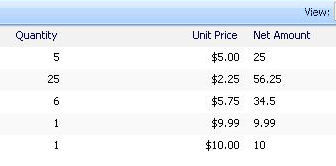
Calculated column in sharepoint list
please follow the steps:
1. Create three columns Quantity, Unit Price & Net Amount
2. Columns types: Quantity [Number], Unit Price [Currency], Net Amount [Calculated (Calculation based on other columns)]
3. While creating Net Amount Column give text which is quotes (avoid quotes) “=[Quantity]*[Unit Price]”

Formatted text in Sharepoint list
1. Open the site in Sharepoint Designer
2. Select the list webpart and convert it into XSLT Data View
3. Select the column text which you want to make as bold/italic right click and take mouse over on Format Item as option and click on Text
4. Then format the text accordingly.