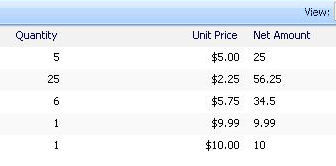
Calculated column in sharepoint list
please follow the steps:
1. Create three columns Quantity, Unit Price & Net Amount
2. Columns types: Quantity [Number], Unit Price [Currency], Net Amount [Calculated (Calculation based on other columns)]
3. While creating Net Amount Column give text which is quotes (avoid quotes) “=[Quantity]*[Unit Price]”

Hi – I’m trying to create a calculate column on my page – but the unit cost is located on another page in sharepoint. Is there any way to reference that other page or can you only use the calculate field if the unit and the number of units are both on the same page?
thanks
Paul
@Paul Elksnis: Does the two pages exists in the same site or different sites? please confirm