A KPI tiles web part for SharePoint
You want a row of key numbers across the top of your intranet home page. Open tickets, headcount, uptime, engagement, each with a small trend arrow. Modern SharePoint does not have a web part for that, so I built one.
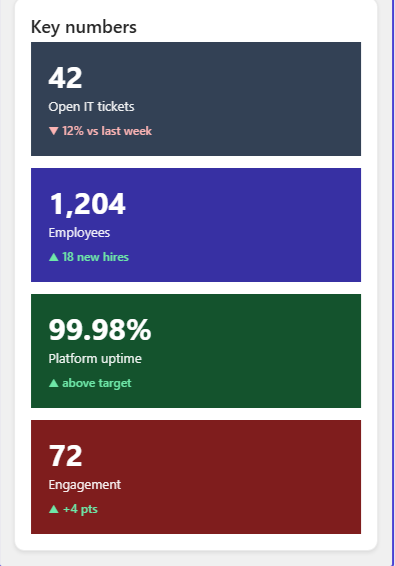
It reads a SharePoint list. One row is one tile. The row needs a Title for the label, a text column KpiValue for the number, a Choice column KpiTrend (Up, Down or Flat) for the arrow, and a text column KpiDelta for the small line underneath.
You do not have to build that list by hand. The package ships a script, Provision-IntranetLists.ps1, that creates the KPIs list with those columns and a few sample rows.
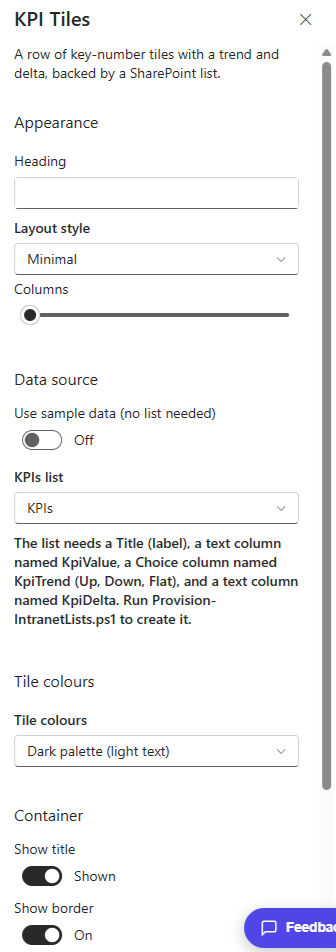
In the property pane you pick a Layout style, the number of Columns, and the KPIs list to read. The part I like is Tile colours. Leave it plain, or pick a soft, fluorescent, water or dark palette, and each tile takes its own colour from that family. The screenshot above uses the dark palette.
It shows sample data until you turn that off, so you can drop it on a page and see it working before you wire up the list.
The KPI Tiles web part is part of my open source SPFx Intranet Suite, a set of web parts for a modern SharePoint intranet. Install the package once and it shows up in the toolbox under Intranet Suite.


One Comment
Comments are closed.