In my last post I have show you how to retrieve current user profile in Sharepoint 2007, before that I have also posted on how to display custom list items in SPGridView
Today I am going to work on how to export SPGridView items into Excel spreadsheet in Sharepoint 2007
Most of the code I have used form Matt Berseth blog article Export GridView to Excel so thanks to Matt and also thanks to my colleague Ram Gowri who helped me on this
To run the code first you need to create a custom list, name it as Countries, then create two columns int he same list Country and State
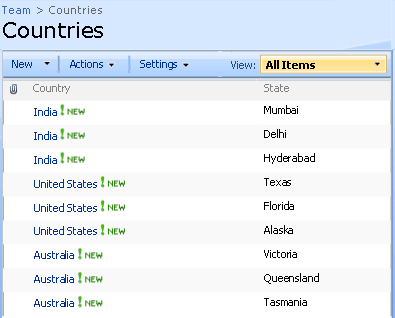
Sharepoint OOB custom list
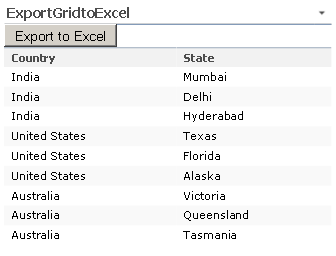
Displaying Sharepoint custom list items into SPGridView
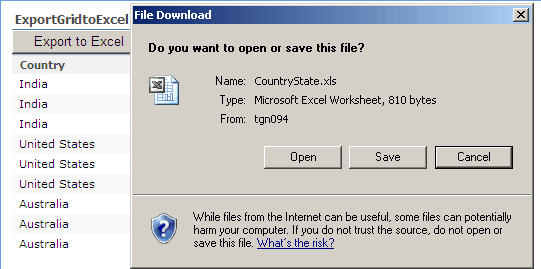
Exporting SPGridView to Excel Spreadsheet
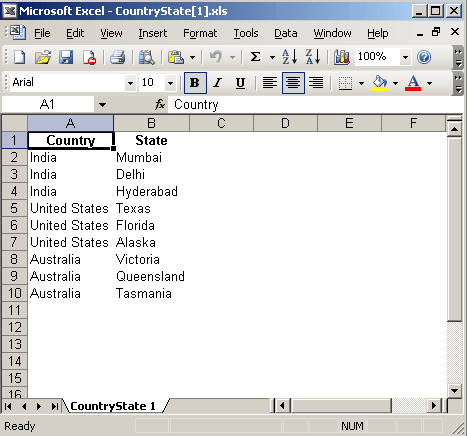
After exporting SPGridView items in to Excel spreadsheet
using System;
using System.IO;
using System.Web;
using System.Runtime.InteropServices;
using System.Web.UI;
using System.Web.UI.WebControls.WebParts;
using System.Xml.Serialization;
using System.Web.UI.WebControls;

using Microsoft.SharePoint;
using Microsoft.SharePoint.WebControls;
using Microsoft.SharePoint.WebPartPages;

namespace ExportGridtoExcel
{
    [Guid("2fa65763-1ef1-4173-8a77-685e840f0196")]
    public class ExportGridtoExcel : System.Web.UI.WebControls.WebParts.WebPart
    {
        SPGridView myGridView;
        SPDataSource myDataSource = new SPDataSource();
        Button oBtn_Export;

        protected override void CreateChildControls()
        {
            oBtn_Export = new Button();
            oBtn_Export.Text = "Export to Excel";
            oBtn_Export.CssClass = "ButtonHeightWidth";
            oBtn_Export.Click += new EventHandler(oBtn_Export_Click);
            this.Controls.Add(oBtn_Export);

            myGridView = new SPGridView();
            myGridView.Enabled = true;
            myGridView.AutoGenerateColumns = false;

            SPBoundField colTitle = new SPBoundField();
            colTitle.DataField = "Country";
            colTitle.HeaderText = "Country";
            this.myGridView.Columns.Add(colTitle);

            SPBoundField colMission = new SPBoundField();
            colMission.DataField = "State";
            colMission.HeaderText = "State";
            this.myGridView.Columns.Add(colMission);

            this.Controls.Add(myGridView);
        }

        void oBtn_Export_Click(object sender, EventArgs e)
        {
            ExportToExcel("CountryState.xls", myGridView);
        }

        protected override void OnPreRender(EventArgs e)
        {
            base.OnPreRender(e);
            SPSite mySite = SPContext.Current.Site;
            SPWeb myWeb = SPContext.Current.Web;
            SPList list = myWeb.Lists["Countries"];
            myDataSource.List = list;
            myGridView.DataSource = myDataSource;
            myGridView.DataBind();
        }

        public static void ExportToExcel(string strFileName, SPGridView gv)
        {
            using (StringWriter sw = new StringWriter())
            {
                using (HtmlTextWriter htw = new HtmlTextWriter(sw))
                {
                    //  Create a form to contain the grid
                    Table table = new Table();

                    //  add the header row to the table
                    if (gv.HeaderRow != null)
                    {
                        PrepareControlForExport(gv.HeaderRow);
                        table.Rows.Add(gv.HeaderRow);
                    }

                    //  add each of the data rows to the table
                    foreach (GridViewRow row in gv.Rows)
                    {
                        PrepareControlForExport(row);
                        table.Rows.Add(row);
                    }

                    //  add the footer row to the table
                    if (gv.FooterRow != null)
                    {
                        PrepareControlForExport(gv.FooterRow);
                        table.Rows.Add(gv.FooterRow);
                    }

                    //  render the table into the htmlwriter
                    table.RenderControl(htw);

                    HttpContext.Current.Response.Clear();
                    HttpContext.Current.Response.AddHeader("content-disposition", string.Format("attachment; filename={0}", strFileName));
                    HttpContext.Current.Response.ContentType = "application/ms-excel";
                    HttpContext.Current.Response.Cache.SetCacheability(HttpCacheability.NoCache);
                    //render the htmlwriter into the response
                    HttpContext.Current.Response.Write(sw.ToString());
                    HttpContext.Current.Response.End();
                }
            }
        }

        private static void PrepareControlForExport(Control control)
        {
            for (int i = 0; i < control.Controls.Count; i++)
            {
                Control current = control.Controls[i];
                if (current is LinkButton)
                {
                    control.Controls.Remove(current);
                    control.Controls.AddAt(i, new LiteralControl((current as LinkButton).Text));
                }
                else if (current is ImageButton)
                {
                    control.Controls.Remove(current);
                    control.Controls.AddAt(i, new LiteralControl((current as ImageButton).AlternateText));
                }
                else if (current is HyperLink)
                {
                    control.Controls.Remove(current);
                    control.Controls.AddAt(i, new LiteralControl((current as HyperLink).Text));
                }
                else if (current is DropDownList)
                {
                    control.Controls.Remove(current);
                    control.Controls.AddAt(i, new LiteralControl((current as DropDownList).SelectedItem.Text));
                }
                else if (current is CheckBox)
                {
                    control.Controls.Remove(current);
                    control.Controls.AddAt(i, new LiteralControl((current as CheckBox).Checked ? "True" : "False"));
                }

                if (current.HasControls())
                {
                    PrepareControlForExport(current);
                }
            }
        }
    }
}


This is really a great post, was very helpful.
In my case i have paging on, and when i export it only exports the 1st page but the pager contains more. Do you have an idea?
@ Cango, please follow the Mattberseth post so that you will be able to export all pages data too http://mattberseth2.com/demo/Default.aspx?Name=Export+GridView+to+Excel&Filter=All
Great post. I’d like to add a little comment.
With the current code, once you click the “Export” button once, other controls will become unresponsive since WSS post-back will not work. You cannot export another copy neither. The following property assignment of the “Export” button is required for other post-back to work (including the “Export” button itself)
oBtn_Export.OnClientClick = “_spFormOnSubmitCalled = false;_spSuppressFormOnSubmitWrapper=true;”;
Cheers,
Kien
Hi, I am a beginner in Sharepoit 2007, I have an query regarding this post. how to create a button on sahrepoint list page (e.g. http://—-/allitems.aspx), if this is possible in sharepoint designer then how to call the webpart on clicking the button ‘Export to Excel’. please suggest me the way, it’s very urgent, I have to implement this
Thanks,
Harsh
@ Harsh: You can create a custom webpart which has only button, on button click you can execute the code above posted code.
Vijai, i tried to implement the above for a SharePoint list on (http://—-/allitems.aspx), but it gives me error – Object reference not set to an instance of an object.
Please advise.
Thanks.
To Kien Tran: Nice one!
I too am fairly new to SP2007 Development but had a more tricky issue. Rather than have a funky button to support the Export, I preferred to rather add a Verb to the Webpart such that the webpart dropdown menu renders the ‘Export File’ option; looks tidier.
1. Override the WebPartVerCollection
2. Create my new Verb :
WebPartVerb verb = new WebPartVerb(“AlertsReportExport”, OnExportClick, “_spFormOnSubmitCalled = false;_spSuppressFormOnSubmitWrapper=true;”);
3. Add it to the Verbs collection and then return it.
Cheers
If I enable the grouping on SPGridview, will it also export with grouping?
I tried without grouping, excel files is creating but nothing appearing in excel. let me know am I missing anything?
@ Briana: No, it won’t export with grouping even if you enable on SPGridView
@ Briana: Have you modified any code? if possible post your code, thanks
@ Rittika: Can you please post the error message, have you tried to debug the code, please provide me more information, thanks
I am trying to export an spgridview that has a SPMenufield, however once exported the SPMenufield is not properly exported. I just get some hyperlinks which don’t make any sense. How do you “PrepareControlForExport” for SPMenuField?
@G Vijai Kumar
I am using your code in an aspx page with inline code. I used your code as it without changing anything and calling it on button click. It create a blank excel sheet thne I debug the code and noticed that it is not adding heading row as well not going in for-each loop. In my aspx page spgridview control is already added. I dont think it should be the problem. Secondly I also noticed that after executing the excelsheet If I try to re-click on buton, nothing happen.
Please advise
Where do I place the code? Can I put it in a cewp?
Great code, it was a real help.
Thank you!
@ Chris: You can create webpart solution then try to put the code in the appropriate methods as shown in the post, let me know if you need more info, thanks
Your code is not working for grouped SPGridView. Please help me to sort out.
Hi,
I’m trying to use your code, but I’m getting an error in the excel file itself.
The error says that the controls need to be placed in a form with runat=server property.
When I try to add the form, it says that there is allready a form defined.
I’m doing this on SharePoint 2007, using an application page.
Any ideas on where I can start looking?
I am able to export the data. but it also export the link and some image link. how to remove the link and image
Hi
Iam Using ur working fine but iam creating Visual Webpart in sharepoint 2010 At the time iam Getting This Errors
1)Control “Grid view1” of type “Grid view” must be placed inside a form tag with runat=server.
H ere am added
public override void VerifyRenderingInServerForm(Control control)
{
}
again error
2) register for event Validation can only be called during render();
Here am added like that
Again Error
3)
Error 1 ‘NOTEBOARD.VisualWebPart1.VisualWebPart1UserControl.VerifyRenderingInServerForm(System.Web.UI.Control)’: no suitable method found to override
Plz help this errors…
Thank
Ramesh
Hi
Iam Using ur Code working fine but iam creating Visual Webpart in sharepoint 2010 At the time iam Getting This Errors
1)Control “Grid view1” of type “Grid view” must be placed inside a form tag with runat=server.
H ere am added
public override void VerifyRenderingInServerForm(Control control)
{
}
again error
2) register for event Validation can only be called during render();
Here am added like that
Again Error
3)
Error 1 ‘NOTEBOARD.VisualWebPart1.VisualWebPart1UserControl.VerifyRenderingInServerForm(System.Web.UI.Control)’: no suitable method found to override
Plz help this errors…
Thank
Ramesh
Can you please let me know the steps of using the code. I have created the list but i am not able to proceed forward.
I am getting error that Control must be places inside form tag. So i know the solution to add public override void VerifyRenderingInServerForm(Control control)
{
}
but where do i write this code? I only have option to wite in C# code is my usercontrol code page. I do not have a c# code file for Site Pages aspx pages nor I do have access to maser page code file access. any suggestions ?
PLease let me know.
Thanks in advance.
Forgot to mention that , if I write above line of code in ASCX page ( user control ) it still gives error, it does not work in sharepoint 2010!!!
I am able to export the data. but it also export the link and some image link. how to remove the link and image,when click on the image link its showing javascript error. could you please help me on this
Hi there, great post! This is definitely what i’m looking to do for a project that I am working on. Could you tell me how and where I would apply this code to?
Hi, I am a beginner in Sharepoit, i use sharepoint 2010 + infopath for create form, how to add the code to the button in allitems.aspx form
Hi All,
I want to remove the gridview below the button.
I wnat to remove the HTML that comes while exporting people picker (links to user profile) and lookups (link to the lookup item) from the excel file and make them plain text.
Please advise how this can be acheived.
hi, thank you for this great post. it is really helped me. But there are a problem. some characters displayed wrong. how can i solve this problem. i have added to code charset, encoding etc. but they didn’t work. what can i do?