
A site header, footer and feedback button for SharePoint with SPFx
Web parts sit on a page. Some things need to sit on every page. A header, a footer, a way to give feedback. Those are SharePoint Framework extensions, not web parts, and the suite ships three of them.
A site-wide header
Modern SharePoint gives you a site header you cannot do much with. This extension adds your own header band across the top of every page. A brand or a logo, a row of navigation links, and an optional button on the right. It can hide the built-in site header so you do not end up with two.
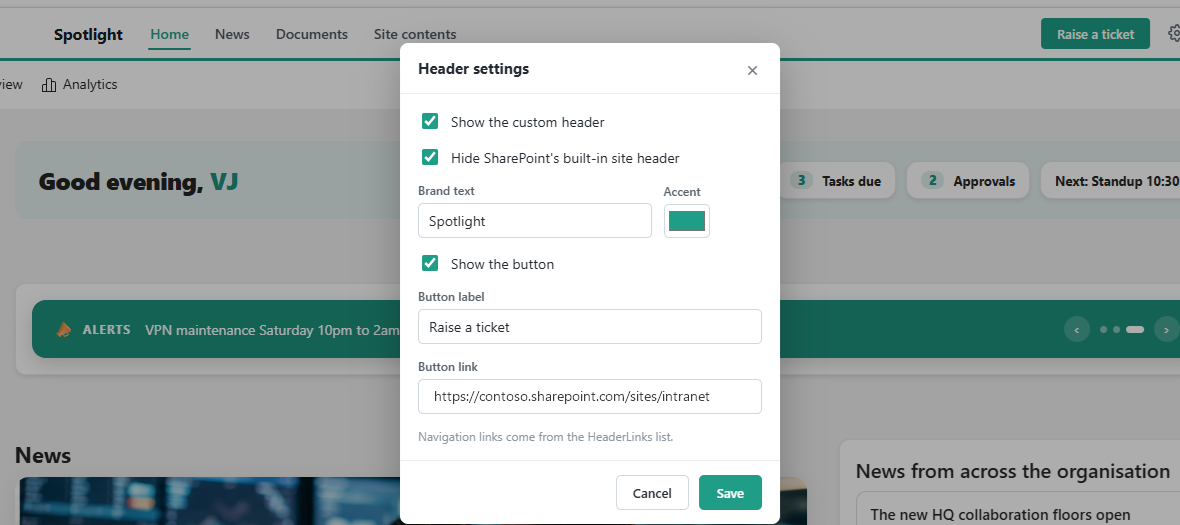
The part I like is that a site owner does not need PowerShell to change it. There is a small gear in the header, visible only to people who can manage the site. It opens the panel above. Turn the header on or off, change the brand and the accent colour, show or hide the button, set its label and link. The navigation links come from a HeaderLinks list. It saves to a config list, so the change is live for everyone straight away.
A site-wide footer
The footer is a slim bar at the bottom of every page. A brand line, a row of links, an optional set of social icons, and a copyright line. The links come from a FooterLinks list so you edit them without touching code. It is revealed when you scroll to the bottom, and it replaces the built-in site footer so there is only one.
A feedback button
The third extension is a small feedback button pinned to the bottom right of every page. Anyone can click it, leave a rating and a comment, and tick a box if they are happy for you to follow up. It writes to a Feedback list, along with the page they were on, so you can see where the feedback came from.
All three are in the same package as the web parts. They are set on each site with a short PowerShell script. They are part of my open source SPFx Intranet Suite, a set of web parts for a modern SharePoint intranet.


2 Comments
Comments are closed.