semantic index

Does Microsoft 365 Copilot copy your data to answer you?

Propose Copilot to a security-minded colleague and you get the same question within about thirty seconds. “So it makes a copy of all our data? Where does that copy live? Who else can see it?” The mental picture is Copilot hoovering up every file in the tenant into some giant AI brain in the sky. The reality is a lot more boring, and a lot more reassuring. Here is what actually happens.

The short answer

Copilot does not make a copy of your documents to answer you. It reads your content in place, through Microsoft Graph, the same plumbing that already powers search across Microsoft 365. When you ask something, it goes and finds the relevant material you already have access to, uses it to answer, and moves on. Your files stay exactly where they are.

But it does build an index, so isn’t that a copy?

This is the part that trips people, because it is technically true that Copilot builds something out of your data. It is called the semantic index, and the word “index” is the one that matters. It is not a copy of your files. It is a mathematical representation of them.

Microsoft turns your text content into vectors  numbers that capture meaning  so that “the vendor did great design work” and “the supplier’s artwork was excellent” land close together even though they share no words. That is what lets Copilot answer a fuzzy question well. But a pile of vectors is not your document. You cannot reassemble the payroll spreadsheet from the index any more than you can rebuild a song from its search tags.

And that index never leaves your tenant. In Microsoft’s own words, the data generated by indexing remains within your company’s tenant. The user-level index sits where your mailbox lives; the tenant-level index sits in an isolated container in your own tenant’s region. It doesn’t even count against your storage quota. And it honors the same permissions as everything else, so it only ever helps surface content you were already allowed to open.

What actually happens when you ask

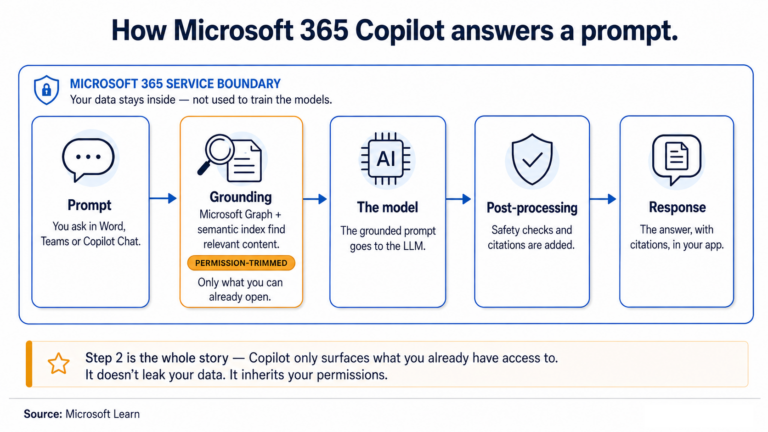
Here is the full sequence when you type a prompt, straight from Microsoft’s documentation:

  1. Your prompt goes from the app to Copilot.
  2. Copilot checks Microsoft Graph and the semantic index for relevant, permission-trimmed context, and appends what it finds to your prompt.
  3. That grounded prompt goes to the language model.
  4. The model’s response comes back.
  5. Copilot runs a post-processing pass, adds citations, and returns the answer to your app.

The content pulled in at step 2 is used to answer, and then it is done. It is grounding for that one question, not a copy squirrelled away somewhere.

So what is stored?

Something is kept, and it is worth being precise about what. Copilot stores the conversation — your prompt and its response, with citations — as your Copilot activity history. That is encrypted, stored alongside your other Microsoft 365 content, discoverable and retainable through Microsoft Purview, and you can delete it yourself from the My Account portal.

Read that again: what is stored is the chat, not a second copy of your source files. The spreadsheet Copilot cited still lives in its one place in SharePoint. The record is simply that you asked about it and what Copilot said back.

Three things that usually settle the room

  • None of it trains the AI. Your prompts, your responses, the data pulled from Graph, and the semantic index itself are not used to train the foundation models. Microsoft states this flatly, in more than one place.
  • No human is reading it. Azure OpenAI has an abuse-monitoring feature that includes human review of content. Microsoft 365 Copilot has explicitly opted out of it.
  • It stays in your boundary. The data honors your tenant isolation and residency commitments, including the EU Data Boundary for EU customers.

So where is the actual risk?

If the data handling is this clean, what is left to worry about? The one thing all of it was careful to preserve: permissions. The index respects them. Grounding respects them. Copilot only ever surfaces what a person could already open.

Which means Copilot was never going to leak your data by copying it. It will, however, faithfully surface anything you already overshared, to whoever you overshared it with, the moment they ask. You can pull a genuinely sensitive site out of the index — by turning off its search visibility or excluding it with a DLP policy — but notice what that is: hiding, not fixing. The people who could already reach it still can.

That is the whole story. Copilot does not copy your data. It indexes it as vectors inside your own tenant, searches it in place, shows each person only what they could already access, keeps the conversation rather than your files, and trains nothing. The question worth losing sleep over was never where your data goes. It is who can already reach it — and that part is still yours to answer. It is what I built User Access Explorer to show.

Sources

Every claim above comes from Microsoft’s own documentation. If you want to read the primary material: