Glean

Microsoft 365 Copilot vs Glean: the permissions question that actually decides it

Sooner or later, someone in a Microsoft shop asks it out loud: should we just buy Glean instead of turning on Copilot? Usually the thinking is that one of them must be safer with company data than the other. It is a fair question, and the honest answer is not the one either vendor’s deck gives you.

Both are enterprise AI that answers questions over your own company content. Microsoft 365 Copilot does it from inside Microsoft 365, grounded on your SharePoint, OneDrive, Exchange and Teams, reaching outside through Graph connectors. Glean does it across the whole app estate, pulling from Google Drive, Slack, Salesforce, Jira, Confluence, Microsoft 365 and the rest through its own connectors. One is deep in one place. The other is broad across many. Hold that thought, because it is the real difference and we will come back to it.

The thing they do identically

First, the part people get wrong. Both are permission-aware. Neither invents access.

Glean pulls the permission map, the access-control list, from every source it connects to, and filters what it retrieves down to what you personally can see. In their own words, if you do not have access to a document in Google Drive or a channel in Slack, it never appears in your Glean results and never lands in an answer it writes for you.

Copilot behaves the same way inside Microsoft 365. Every prompt runs in your security context. If you cannot open a file in SharePoint, Copilot will not summarise it for you. It only ever surfaces what you already had permission to reach.

So on the question people actually lose sleep over, “will it hand data to someone who should not see it”, both give the same answer: no, not beyond what your permissions already allow.

The mess both of them inherit

And there is the catch neither deck leads with. Permission-aware cuts both ways. It faithfully reproduces your access model, mess and all.

A document shared with Everyone is a document both of them will happily hand to everyone, because everyone genuinely has permission. A folder a departing employee opened up three years ago is fair game the moment somebody asks the right question. Neither tool overshares. Your tenant already did. The assistant just takes what was buried under a thousand folders and makes it instantly reachable, in plain language, to anyone who thinks to ask.

This is why switching from one to the other fixes nothing about safety. If your SharePoint is overshared, Copilot surfaces it. If your Drive and Slack are overshared, Glean surfaces it. The assistant is only ever as clean as the permissions underneath it, and picking a different assistant does not clean them.


So what actually decides it

If safety is a wash, two things are left, and these are the ones to argue about.

Reach. Copilot is native and deep in Microsoft 365, so if that is where your knowledge lives, it needs nothing extra to be useful, with Graph connectors extending it outward when you need them. Glean’s whole pitch is breadth: if your organisation’s knowledge is scattered across a dozen SaaS apps, Glean was built to index all of it in one place and answer across the lot. A heavily Microsoft shop leans one way. A best-of-breed-SaaS shop leans the other. This, not security, is the honest deciding line.

The governance around it. Microsoft does not just hand you Copilot, it hands you the machinery to manage the oversharing Copilot exposes: Purview for data loss prevention and sensitivity labels, SharePoint Advanced Management for Restricted Content Discovery, Restricted Access Control, and the Data Access Governance reports. Glean brings its own model, single-tenant connectors, permission sync kept current across every app, least-privilege enforcement, and zero-retention agreements with the model providers so your data is never used for training. Both are serious. They are serious in different shapes: one is a governance stack you assemble around the assistant, the other is a posture baked into the platform.

The honest verdict

So it is not “which is safer”, because on the answer that matters they behave the same. It is “where does your knowledge actually live, and how much Microsoft governance do you already own”. A Microsoft-centric org already holding Purview and SharePoint Advanced Management has most of the toolset and the native depth in hand. An organisation whose real knowledge is spread across non-Microsoft SaaS has a genuine case for Glean’s breadth.

But the decision underneath both, the one that actually determines whether either is safe to switch on, is the same no matter which logo you pick. They surface what people can already reach. So the work is not choosing the assistant. The work is fixing the oversharing first, so that when you do turn one on, it has nothing embarrassing to find.

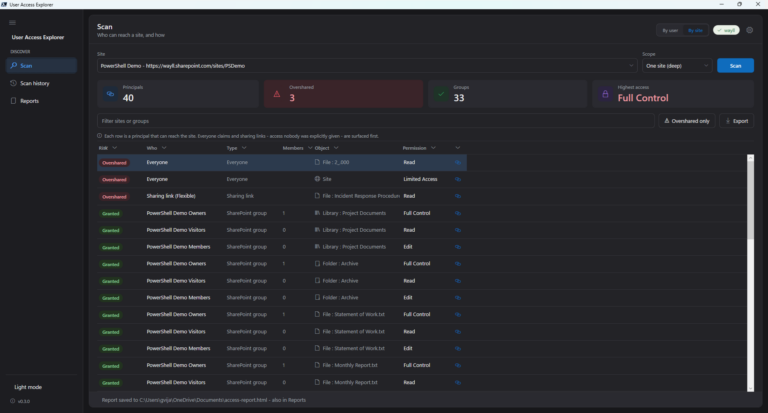
That part, the who-can-currently-reach-what across your Microsoft estate, is what I built User Access Explorer to show. Whichever assistant you land on, do that first.