Set task list title textbox to readonly mode in Sharepoint 2007
One of my client asked to set the task list title textbox to readonly mode when the user selects edit item property from the context menu.
So, I thought to complete this scenario by making use of javascript
- Open the EditForm.aspx in Sharepiont designer
- Select one td tag to write the javascript which sets the Title textbox to readonly mode
- First of all write <script language=”javascript”>
- Then document.<formname>.<textboxname>.disabled=”true”;
- In the above step form name can be found by selecting the page view source of Editform.aspx
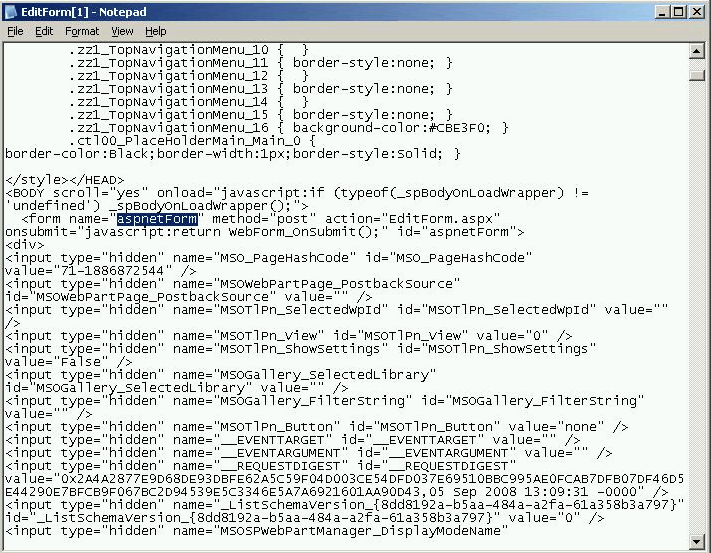
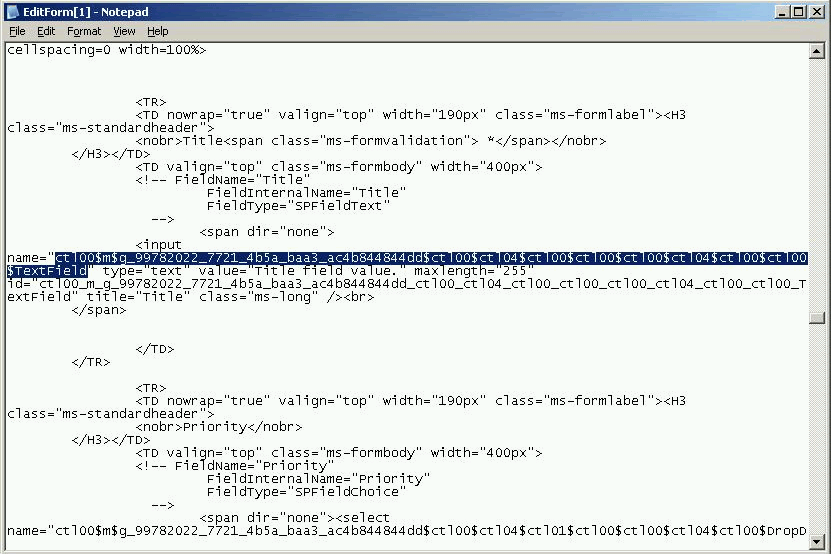
- In the same way find out the textbox name by selecting the page view source of Editform.aspx
- At last your script looks like this
<!–Textbox Readonly Script Starts Here–>
<script language=”javascript”>
document.aspnetForm.
ctl00$m$g_99782022_7721_4b5a_baa3_ac4b844844dd$ctl00$ctl04$ctl00$ctl00$ctl00$ctl04$ctl00$ctl00$TextField.
disabled=”true”;
</script>
<!–Textbox Readonly Script Ends Here–>
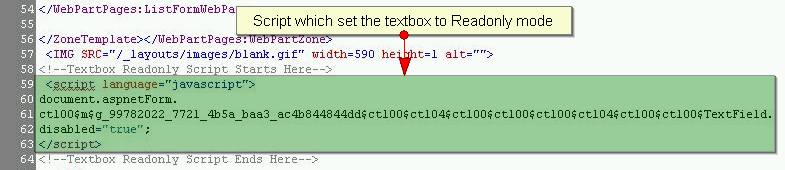
- Add the script tag in some td (example:<td>Script goes here…</td>) as shown in above image
- Save EditForm.aspx in Sharepoint designer and browse in explorer, now you can view the Title textbox is set to readonly mode, means users cannot edit the Title textbox
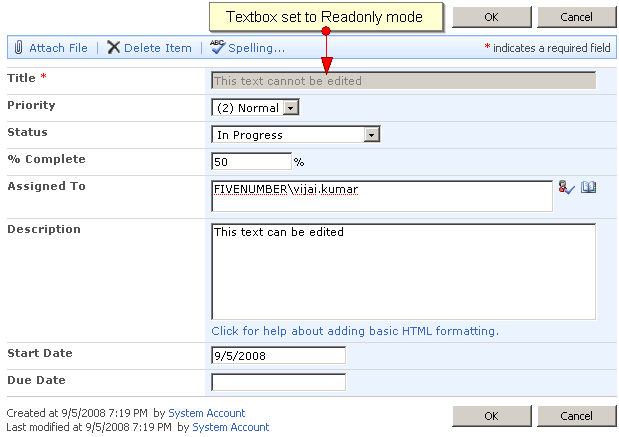
I tried this javascript as indicated in image #3, using SPD and the correct form and textbox names for my list. It did make the field readonly but it deletes the previous content of the readonly field after I save my other changes through the EditForm. Please let me know if I’m missing something.
Hi thanks for this nice tip,
i’m having the same problems as Elmer.
I tried this with a Task List. Added a new Task with priority = “(3)low”. Set “priority” to Read-Only. Opened the taskitem again with editform.aspx : “priority” was readonly – so the script is working well. But when i did some changes to the other fields of the taskitem, “priority” was set to “(1)high”.
any ideas ?
where editform.aspx located in sharepoint.. can u please help to me… urgent
if change done in the editform.aspx title text was not able to disable.. please help me out
Hi, I would like to same thing to be done, but with hyperlink field, so that user can’t edit in edit mode but should be able to click the link. please help.
@ Labesh: Please use Office Toolbox solution available at Codeplex, you can find the solution at http://officetoolbox.codeplex.com/
Let me know in case if you need more information, thanks for looking into the post.
Thanks a lot, it is quite usefull. i am gonna try this. labhesh
Thanks for ur Info.. It was very helpful.. can u give me updates regaring ur post to my mail..
on updating the data already exisitng in the field is lost
I’m struggling to find the EditForm.apsx file to edit.
Can anyone help with where I will find this. I can find the DispForm.aspx file, should it be in the same folder?
@ Joanne: You can find the EditForm.aspx when you open the site in SharePoint designer under lists fodler, Good Luck
Hi GVK, When u put this form field in disabled state, The already existing valus in disabled mode is not being treated as a value and if that is required field then its coming as validation required field error.
How could we resolve this issue, look forward for the reply.
Thank you,
Hari Gillala
when u keep the field disabled, if it was arequired field then the existing value is not being submitted. How to solve this?
@ Hari: Please use http://officetoolbox.codeplex.com/ I guess using the CodePlex solution you will be able to meet your requirement, let me know if you require any other information
Hi GVK, Thanks for replying to the post. I have tried to install codeplex code on some machines I can see the feature being installed and on other machines it being installed but the feature is not availble.
hi,
I used the above but it looses value on postback (e.g. when we have validation postback)
use readOnly, instead of disabled