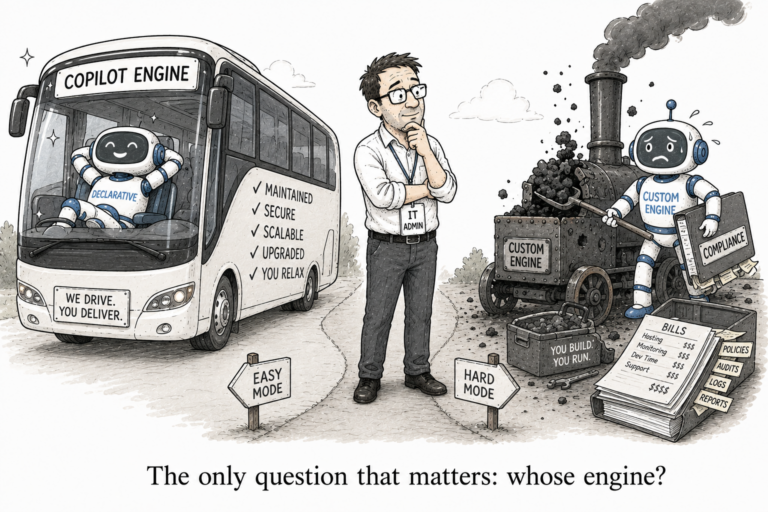
declarative agents

Copilot agents explained declarative vs custom engine (and which you actually need)

Everyone is building Copilot agents now, and the first fork you hit is a confusing one: a declarative agent, or a custom engine agent? The names do not help, and most explanations bury the answer under a feature table. So here is the distinction that actually decides it, and it comes down to a single question: whose engine runs the thing.

What an agent even is

Strip away the jargon and an agent is a specialized version of Copilot. You give it instructions, some knowledge to draw on, and maybe a few actions it can take, and it shows up where your users already work in Teams, in Word, in the Copilot chat. An IT helpdesk agent that answers from your policies. A sales agent that pulls from your CRM. The two types are simply two different ways of powering that.

The one distinction that matters

The single thing that separates them is whose orchestrator and model does the reasoning.

A declarative agent runs on Copilot’s engine. You bring the instructions, the knowledge and the actions; Microsoft brings the orchestrator, the foundation model, the hosting and the compliance. You are not building an AI so much as configuring Copilot’s.

A custom engine agent runs on your engine. You bring the orchestrator, the model and the hosting, typically on Azure. You are building an AI application that plugs into Copilot’s surfaces, rather than borrowing Copilot’s brain.

Everything else the cost, the compliance, the flexibility — follows from that one choice.

What follows from it

Because a declarative agent rides on Copilot’s infrastructure, it needs no extra hosting and carries no extra hosting bill, and it inherits Microsoft 365’s security, compliance and responsible-AI guarantees automatically. The trade is that you are limited to Copilot’s model and orchestration you cannot swap in your own and the agent responds only when a user talks to it.

A custom engine agent gives all that flexibility back, and hands you the responsibilities with it. You choose the model, any model, and write the orchestration for whatever complex, multi-step logic you need. It can act proactively, without a user prompting it, and coordinate with other agents. But it lives on hosting you pay for, and the compliance, security and responsible-AI work is now yours to prove, not Microsoft’s to guarantee.

Tooling is not the dividing line

People assume the split is low-code versus pro-code. It is not. A declarative agent you can build with no code at all, in the Agent Builder that sits inside Copilot, or in code with the Microsoft 365 Agents Toolkit. A custom engine agent you can start low-code in Copilot Studio, or go full pro-code in Visual Studio with .NET or Python, Semantic Kernel or LangChain.

So the dividing line is whose engine, not which tool.

Which one to build

Start with the scenario.

Build declarative when the work lives inside Microsoft 365 and Copilot’s own intelligence is enough. A helpdesk agent that answers @mentions in a Teams channel from your IT policies. A document agent invoked in SharePoint to summarise a library. You want it fast, you want it to inherit compliance, and you are happy with Copilot’s model. This covers most of what organisations actually want, and it is where I would tell almost anyone to start.

Build custom engine when declarative genuinely cannot do it. When you need custom orchestration for real business logic a loan-approval agent with rules and multiple system checks. When you need your own or a domain-specific model. When the agent must act proactively, serve a whole group in a Teams channel, or live outside Microsoft 365 as well. These are real needs, but they are the exception, not the default.

The rule of thumb

It writes itself: start declarative, and reach for a custom engine only when you hit a wall declarative cannot clear. Because the moment you go custom engine, you have signed up to own the model, the hosting and the compliance indefinitely — the same trade you make when you build a custom connector instead of using a prebuilt one. Ownership is powerful and expensive, and you want to be sure you need it before you take it on.

The part that quietly goes wrong

One thing holds true whichever you build, and it is worth saying because it is where agents most often go wrong. An agent’s knowledge is grounded in your content through the same permission-trimmed retrieval that Copilot itself uses. Which means an agent is only ever as safe as the access underneath it.

Point a helpful helpdesk agent at an overshared SharePoint site and it will cheerfully answer from whatever that site overshares. The agent did not create the exposure. It just gave it a friendly conversational front door. It is the same lesson as everywhere else Copilot reaches, on a new surface and it is why agent sprawl is the next governance problem worth watching.

So the declarative-versus-custom-engine decision looks like an architecture choice, and it is one. But underneath, it is a question about how much you want to own: Copilot’s engine, or your own. For most scenarios, theirs is the right answer, and the right place to start. Build custom only when you have a reason you can name.