In my previous post you can view the most commonly used custom webparts, Tree View WebPart Shows Sites and Sub-Sites and Menu WebPart Shows Sites and Sub-Sites in Fly-Out Mode
Now I got one more chance to continue the series of most commonly used custom webparts, so once again I come up with a simple Windows Or Youtube Media Player webpart which plays video on Sharepoint sites, the webpart also supports to configure the properties as required.
In the webpart properties section please enter the Windows media or Youtube link, the webpart automatically detects the media type and plays accordingly
Download the solution file WindowsORYouTubeMediaWebPart.wsp
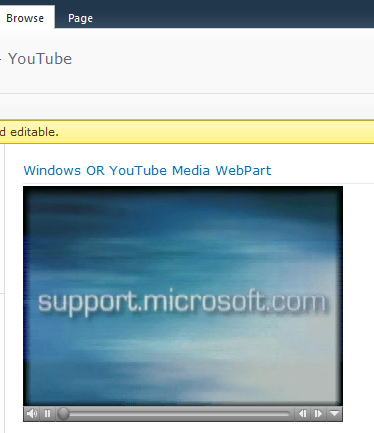
Windows Or YouTube Player WebPart (Playing Windows media Video)
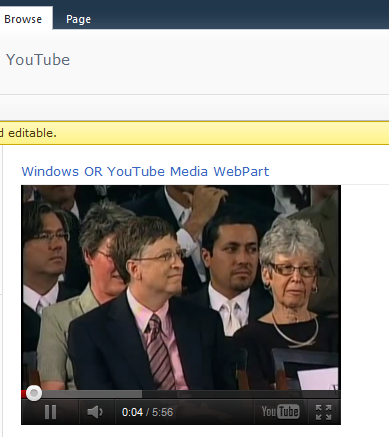
Windows Or YouTube Player WebPart (Playing Youtube Video)
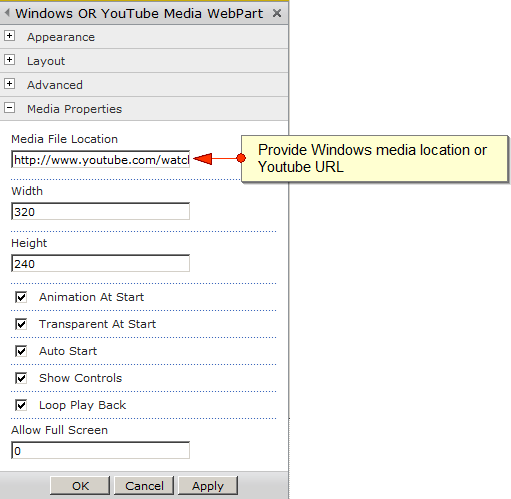
Windows Or YouTube Player WebPart Properties
[sourcecode language=”csharp”]
using System;
using System.ComponentModel;
using System.Web;
using System.Web.UI;
using System.Web.UI.WebControls;
using System.Web.UI.WebControls.WebParts;
using Microsoft.SharePoint;
using Microsoft.SharePoint.WebControls;
namespace WindowsMediaWebPart.MediaWebPart
{
[ToolboxItemAttribute(false)]
public class WindowsMedia : WebPart
{
// Visual Studio might automatically update this path when you change the Visual Web Part project item.
//private const string _ascxPath = @”~/_CONTROLTEMPLATES/WindowsMediaWebPart/MediaWebPart/MediaWebPartUserControl.ascx”;
private string videoFilePath = string.Empty;
private string videoWidth = “320”;
private string videoHeight = “240”;
private bool animationAtStart = true;
private bool transparentAtStart = true;
private bool autoStart = true;
private bool showControls = true;
private bool loopPlayBack = true;
private string frameBorder = “0”;
[WebBrowsable(true),
Personalizable(PersonalizationScope.User),
WebDescription(“Specifies the media file location”),
Category(“Media Properties”),
WebDisplayName(“Media File Location”)]
public string VideoFilePath
{
get { return videoFilePath; }
set { videoFilePath = value; }
}
[WebBrowsable(true),
Personalizable(PersonalizationScope.User),
WebDescription(“Sets the width of the Media player”),
Category(“Media Properties”),
WebDisplayName(“Width”)]
public string VideoWidth
{
get { return videoWidth; }
set { videoWidth = value; }
}
[WebBrowsable(true),
Personalizable(PersonalizationScope.User),
WebDescription(“Sets the height of the Media player”),
Category(“Media Properties”),
WebDisplayName(“Height”)]
public string VideoHeight
{
get { return videoHeight; }
set { videoHeight = value; }
}
[WebBrowsable(true),
Personalizable(PersonalizationScope.User),
WebDescription(“Animation At Start: (True/False)”),
Category(“Media Properties”),
WebDisplayName(“Animation At Start”)]
public bool AnimationAtStart
{
get { return animationAtStart; }
set { animationAtStart = value; }
}
[WebBrowsable(true),
Personalizable(PersonalizationScope.User),
WebDescription(“Transparent At Start: (True/False)”),
Category(“Media Properties”),
WebDisplayName(“Transparent At Start”)]
public bool TransparentAtStart
{
get { return transparentAtStart; }
set { transparentAtStart = value; }
}
[WebBrowsable(true),
Personalizable(PersonalizationScope.User),
WebDescription(“Auto Start: (True/False) Starts the video automatically”),
Category(“Media Properties”),
WebDisplayName(“Auto Start”)]
public bool AutoStart
{
get { return autoStart; }
set { autoStart = value; }
}
[WebBrowsable(true),
Personalizable(PersonalizationScope.User),
WebDescription(“Show Controls: (True/False) Displays media player controls”),
Category(“Media Properties”),
WebDisplayName(“Show Controls”)]
public bool ShowControls
{
get { return showControls; }
set { showControls = value; }
}
[WebBrowsable(true),
Personalizable(PersonalizationScope.User),
WebDescription(“Loop Play Back: (True/False) Repeats the video automatically”),
Category(“Media Properties”),
WebDisplayName(“Loop Play Back”)]
public bool LoopPlayBack
{
get { return loopPlayBack; }
set { loopPlayBack = value; }
}
[WebBrowsable(true),
Personalizable(PersonalizationScope.User),
WebDescription(“Sets the border of the media (applicable for youtube videos)”),
Category(“Media Properties”),
WebDisplayName(“Allow Full Screen”)]
public string FrameBorder
{
get { return frameBorder; }
set { frameBorder = value; }
}
protected override void CreateChildControls()
{
//Control control = Page.LoadControl(_ascxPath);
//Controls.Add(control);
this.TitleUrl = VideoFilePath;
}
protected override void Render(HtmlTextWriter writer)
{
SPSite site = null;
SPWeb web = SPContext.Current.Web;
if (!string.IsNullOrEmpty(VideoFilePath) && !string.IsNullOrEmpty(VideoWidth) && !string.IsNullOrEmpty(VideoHeight))
{
try
{
SPSecurity.RunWithElevatedPrivileges(delegate()
{
site = new SPSite(web.Site.ID);
using (site)
{
if ((videoFilePath.ToLower()).Contains(“youtube.com/”))
{
Uri youtubeUri = new Uri(videoFilePath);
string query = youtubeUri.Query;
string mediaID = HttpUtility.ParseQueryString(query).Get(“v”);
string source = “http://www.youtube.com/embed/” + mediaID;
writer.Write(““);
}
else
{
writer.Write(““);
}
}
});
}
catch (Exception ex)
{
writer.Write(ex.Message);
}
}
else
{
writer.Write(““);
writer.Write(“Please configure the Media WebPart properties in webpart properties section”);
writer.Write(““);
}
}
}
}
[/sourcecode]


I copied the above code and pasted in my project, deployed the solution and added a webpart on the page. But nothing shows up on the screen except the name of the webpart.
@ Sunny: Have you configured the webpart adding on the page as shown in this figure http://www.fivenumber.com/wp-content/uploads/2010/11/32-167×300.jpg
Please confirm
Hi, what code is needed for MediaWebPartUserControl.ascx?
Awesome! It works like I exactly wanted! Thank you very much.
since web part was added, loading the page requires a new wierd credentials page to be entered. large grey box. not the usual ntlm
i’ve configured the webpart properties after adding it correctly on the page but whenever i try to edit a page or configure properties a popup window opens which asks for the user id and password and it does’nt get away until i enter credentials three or four times,kindly help me what should i do so that user id and passwords do not have to be entered again and again.