A quick look on Sharepoint object model programs – Part 2

29 March, 2010 (12:04) | MOSS - Object Model, MOSS - Quick Look | By: G Vijai Kumar

In my previous post you can have a quick look on Sharepoint object model programs – Part 1

Here, once again am going to post Sharepoint object model programs (part 2) with minimum lines of code and are really handy, which are actually most useful even.

Show only BLOG sites:

//STS#0 – Team Site
//STS#1 – Blank Site
//STS#2 – Document Workspace
//MPS#0 – Basic Meeting Workspace
//MPS#1 – Blank Meeting Workspace
//MPS#2 – Decision Meeting Workspace
//MPS#3 – Social Meeting Workspace
//MPS#4 – Multipage Meeting Workspace
//WIKI#0 – Wiki
//BLOG#0 – Blog

static void Main(string[] args)
        {
            SPSite site = new SPSite("http://servername:port");
            foreach (SPWeb web in site.AllWebs)
            {
                string template = web.WebTemplate + "#" + web.Configuration;
                if (template.ToUpper() == "BLOG#0")
                {
                    Console.WriteLine(web.Title);
                }
            }
            Console.WriteLine("Press any key to continue.....");
            Console.ReadLine();
        }

Show services and status in Sharepoint server farm:

static void Main(string[] args)
        {
            SPServiceCollection services = SPFarm.Local.Services;
            foreach (SPService service in services)
            {
                Console.WriteLine("Service Name: {0}", service.Name);
                Console.WriteLine("Service Status: {0}", service.Status);
                Console.WriteLine("-------------------------------------");
            }
            Console.WriteLine("Press any key to continue.....");
            Console.ReadLine();
        }

Adding/Retrieving values to property bag:

static void Main(string[] args)
        {
            using (SPSite siteCollection = new SPSite("http://servername:port"))
            {
                using (SPWeb site = siteCollection.RootWeb)
                {
                    site.Properties.Add("TempKey", "TempValue");//Adding value
                    site.Properties.Update();

                    Console.WriteLine(site.Properties["TempKey"]);//Reading value
                }
            }
            Console.WriteLine("Press any key to continue.....");
            Console.ReadLine();
        }

Read files in a folder:

static void Main(string[] args)
        {
            SPSite site = new SPSite("http://servername:port");
            SPWeb web = site.OpenWeb();
            SPFolder folder = web.GetFolder("Shared Documents");
            SPFileCollection files = folder.Files;
            foreach (SPFile file in files)
            {
                Console.WriteLine(file.Name.ToString());
            }
            Console.WriteLine("Press any key to continue.....");
            Console.ReadLine();
        }

Get content database for all site collections:

 static void Main(string[] args)
        {
                SPSite site = new SPSite("http://CentralAdminSiteURL");
                SPFarm farm = site.WebApplication.Farm;
                SPWebService service = farm.Services.GetValue<SPWebService>("");
                foreach (SPWebApplication webapp in service.WebApplications)
                {
                    foreach (SPSite mysite in webapp.Sites)
                    {
                        Console.WriteLine(mysite.Url+" ----- "+ mysite.ContentDatabase.Name);
                    }
                }
            Console.WriteLine("Press any key to continue.....");
            Console.ReadLine();
        }

MVP OPEN DAY 2010 at MSIDC, HYD

26 February, 2010 (15:17) | MVP | By: G Vijai Kumar

The MVP open day South Asia sessions started with the IT Pro Round table by Ravi Sankar, addressing the details how IT Pro evangelism team to be forwarded.

Then followed by the DPE Round table with Stuti Shukla. In DPE session we were asked to present our thoughts on topics like

Top 5 Challenges faced by developers

How Microsoft can better meet the needs of the SME segment

How they can compete more effectively in the web space.

Our team and all other presented excellent presentations, kept their thoughts. we have got the opportunity on including the thoughts on topic ‘Top 5 Challenges faced by developers’ where we had put out thoughts.

Stuti Shukla the collected all the feedback from the teams.

Following are few pictures at MVP open day

MVP Open Day accommodation at ISTA hotel, HYD

MVP Open Day accommodation at ISTA hotel, HYD

Group Photo at MSIDC, Hyderabad

Group Photo at MSIDC, Hyderabad

One more Group Photo

One more Group Photo

Karaoke Events

Karaoke Events

MSIDC campus, HYD

MSIDC campus, HYD

Microsoft Most Valuable Professional

8 January, 2010 (16:32) | Announcements | By: G Vijai Kumar

MVP Logo

MVP Logo

Happy to inform you that, on 1st January 2010 I have received a mail from Microsoft that I have been awarded as Microsoft Most Valuable Professional (MVP) in Sharepoint Server. What a surprise! I am so thrilled, thank you so much MICROSOFT for recognizing my contributions and honoring me with MVP award

The mail I received from Microsoft

Dear G Kumar,

Congratulations! We are pleased to present you with the 2010 Microsoft® MVP Award! This award is given to exceptional technical community leaders who actively share their high quality, real world expertise with others. We appreciate your outstanding contributions in SharePoint Server technical communities during the past year.

Also in this email:

* About your MVP Award Gift
* How to access www.mvpaward.com to begin taking advantage of your award benefits
* Your MVP Identification Number
* MVP Award Program Code of Conduct

The Microsoft MVP Award provides us the unique opportunity to celebrate and honor your significant contributions and say “Thank you for your technical leadership.”

Toby Richards
General Manager
Community & Online Support

***********************************************************************************************************

Yet another Sharepoint sample site template

12 November, 2009 (12:51) | MOSS - Customization with SPD, MOSS - Master Pages, MOSS - Site Templates | By: G Vijai Kumar

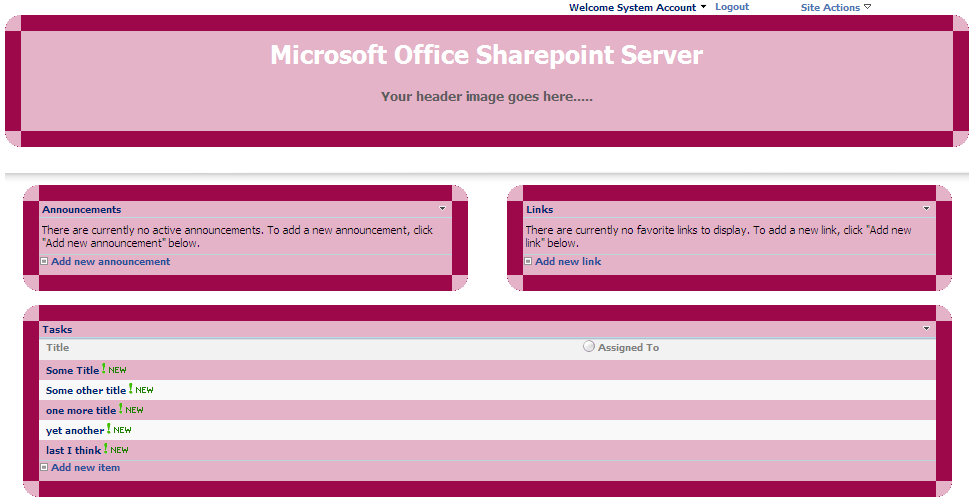
Here I created a simple sample Sharepoint site template with rounded corners.

This template allows you to create a new site with rounded corners around the webparts

Sharepoint Sample Master Page

Sharepoint Sample Site Template

Download the site template

Step by step installation:

  • Log into your SharePoint site
  • Go to Site Settings, under Galleries click on Site Template
  • Then, click on Upload to upload the site template on to the site
  • Browse to the downloaded file and click Open
  • Click Ok to complete the upload process and now the template is available for you to use

Step by step creating of site:

  • Log into your Sharepoint site
  • Go to Site Settings, under Site Administration section click on Sites and Workspaces
  • On Sites and Workspaces page click on Create for creating a new site
  • Provide the necessary information, then select Custom tab
  • You can see the uploaded template listed select the template 5NumberSiteTemplate_Pink.stp
  • Finally, click on Create

Sharepoint list form generator

14 October, 2009 (15:49) | MOSS - Object Model | By: G Vijai Kumar

Today I am going to show you how to generate a list form dynamically as soon as you select the list name you can see the form generated for you with file upload field (attachment). I also know that there is  an excellent solution Sharepoint Form Generator developed by Alon Havivi, but still I want to share with you, so that for some one the code may be helpful as a whole or part of it

No problem whether your list contains 1 field or 100 fields, code will  generate all the ‘n’ no.of fields with file upload field (attachment) contained in the list. It loops through all the input fields and creates at runtime.

All you have to do is, open visual studio 2005/2008 create a new project using webpart template use the code from WebPart1.cs and FormGeneratorToolPart.cs build the project, place the .dll file in GAC or site bin directory, add the necessary safe control tag in Web.config file, import the webpart in to gallery, and add the same on to your site, after adding the webpart in your site you have to select the list name from the webpart properties, so that you can see the generated form similar to the form as in NewForm.aspx

Select the list name from the list of lists

Select the list name from the list of lists

List form generated

List form generated

Download the complete source code (Please Note: Code cannot be viewed properly on the web page, so please use the below links to view the code or for downloading)

WebPart1.cs
FormGeneratorToolPart.cs

WebPart1.cs

using System;
using System.Web;
using System.IO;
using System.Runtime.InteropServices;
using System.Web.UI;
using System.Web.UI.WebControls.WebParts;
using System.Xml.Serialization;
using System.Web.UI.WebControls;

using Microsoft.SharePoint;
using Microsoft.SharePoint.WebControls;
using Microsoft.SharePoint.WebPartPages;

namespace FormGenerator
{
    [Guid("93612d52-737c-4e83-83c3-a228910e87a3")]
    public class FormGenerator : Microsoft.SharePoint.WebPartPages.WebPart
    {
        Table oFormTable;
        FileUpload oFormFileUpload;
        FieldLabel oFormLabelField;
        FormField oFormField;
        Button oFormButtonSubmit;
        Label oFormLabelMessage;

        SPList oFormList;

        private string _FormList = string.Empty;

        string qstitle = string.Empty;
        string qsmission = string.Empty;

        public string FormList
        {
            get { return _FormList; }
            set { _FormList = value; }
        }

        protected override void CreateChildControls()
        {
            base.CreateChildControls();

            oFormTable = new Table();
            oFormTable.CellPadding = 0;
            oFormTable.CellSpacing = 0;            

            oFormLabelMessage = new Label();
            oFormLabelMessage.ID = "lbl_message";
            oFormLabelMessage.CssClass = "ms-formvalidation";
            this.Controls.Add(oFormLabelMessage);

            //Generate Form
            GenerateFormList();
        }

        private void GenerateFormList()
        {
            SPWeb oWeb = Microsoft.SharePoint.WebControls.SPControl.GetContextWeb(Context);
            if (FormList != "")
            {
                try
                {
                    oFormList = oWeb.Lists[FormList];
                    foreach (SPField oField in oFormList.Fields)
                    {
                        if (oField.Type == SPFieldType.Attachments)
                        {
                            FieldLabel oLabelAttachmentField = new FieldLabel();
                            oLabelAttachmentField.ControlMode = SPControlMode.New;
                            oLabelAttachmentField.ListId = oFormList.ID;
                            oLabelAttachmentField.FieldName = oField.InternalName;

                            oFormFileUpload = new FileUpload();
                            oFormFileUpload.ID = "FileUpload";

                            AttachmentsField oAttachmentField = new AttachmentsField();
                            oAttachmentField.ControlMode = SPControlMode.New;
                            oAttachmentField.ListId = oFormList.ID;
                            oAttachmentField.FieldName = oField.InternalName;
                            oAttachmentField.Controls.Add(oFormFileUpload);
                            oAttachmentField.ID = "Control_" + oField.InternalName;

                            TableRow oRowAttachment = new TableRow();
                            oFormTable.Rows.Add(oRowAttachment);
                            TableCell oCellAttachmentLabel = new TableCell();
                            oRowAttachment.Cells.Add(oCellAttachmentLabel);

                            oCellAttachmentLabel.Controls.Add(oLabelAttachmentField);
                            oCellAttachmentLabel.CssClass = "ms-formlabel";
                            TableCell oCellAttachment = new TableCell();
                            oRowAttachment.Cells.Add(oCellAttachment);
                            oCellAttachment.Controls.Add(oAttachmentField);
                            oCellAttachment.CssClass = "ms-formbody";
                        }
                    }

                    // Loop through all the fields in the list
                    foreach (SPField oField in oFormList.Fields)
                    {
                        // Avoid Hidden, Read Only, Attachments field
                        if (!oField.Hidden && !oField.ReadOnlyField && oField.Type != SPFieldType.Attachments)
                        {
                            oFormLabelField = new FieldLabel();
                            oFormLabelField.ControlMode = SPControlMode.New;
                            oFormLabelField.ListId = oFormList.ID;
                            oFormLabelField.FieldName = oField.InternalName;

                            oFormField = new FormField();
                            oFormField.ControlMode = SPControlMode.New;
                            oFormField.ListId = oFormList.ID;
                            oFormField.FieldName = oField.InternalName;
                            oFormField.ID = "Control_" + oField.InternalName;

                            TableRow oRow = new TableRow();
                            oFormTable.Rows.Add(oRow);

                            TableCell oCellLabel = new TableCell();
                            oRow.Cells.Add(oCellLabel);
                            TableCell oCellControl = new TableCell();
                            oRow.Cells.Add(oCellControl);

                            oCellLabel.Controls.Add(oFormLabelField);
                            oCellControl.Controls.Add(oFormField);

                            oCellLabel.CssClass = "ms-formlabel";
                            oCellControl.CssClass = "ms-formbody";
                        }
                    }

                    //Create ASP.Net button
                    oFormButtonSubmit = new Button();
                    oFormButtonSubmit.ID = "btn_submit";
                    oFormButtonSubmit.Text = "OK";
                    oFormButtonSubmit.CssClass = "ms-ButtonHeightWidth";
                    oFormButtonSubmit.Click += new EventHandler(oFormButtonSubmit_Click);
                    this.Controls.Add(oFormButtonSubmit);

                    // Create the row for the Submit button
                    TableRow oRowButton = new TableRow();
                    oFormTable.Rows.Add(oRowButton);

                    // Create the cell for the Submit button
                    TableCell oCellButton = new TableCell();
                    oCellButton.ColumnSpan = 2;
                    oRowButton.Cells.Add(oCellButton);

                    Controls.Add(oFormTable);
                }
                catch (Exception ex)
                {
                    Page.Response.Write(ex.ToString());
                }
            }
            else
            {
                Page.Response.Write("Select valid List from webpart properties");
            }
        }

        void oFormButtonSubmit_Click(object sender, EventArgs e)
        {
            SPSite mySite = SPControl.GetContextSite(Context);
            SPWeb myWeb = SPControl.GetContextWeb(Context);
            SPList myList = myWeb.Lists[FormList];
            SPListItem myItem = myList.Items.Add();

            //Validating the controls
            foreach (SPField sField in myList.Fields)
            {
                if (sField.Required == true)
                {
                    string oControl = "Control_" + sField.InternalName.ToString();
                    Control oFieldControl = this.FindControl(oControl);
                    FormField sFormField = (FormField)oFieldControl;
                    if ((sFormField.Value) == null || (sFormField.Value.ToString()) == "")
                    {
                        oFormLabelMessage.Visible = true;
                        oFormLabelMessage.Text = "* indicates required fields";
                        return;
                    }
                }
            }
            foreach (SPField oField in myList.Fields)
            {
                string oFieldID = "Control_" + oField.InternalName;
                Control sFieldControl = this.FindControl(oFieldID);
                if (sFieldControl != null)
                {
                    if (oField.Type != SPFieldType.Attachments)
                    {
                        FormField sFormField = (FormField)sFieldControl;
                        myItem[oField.InternalName] = sFormField.Value;
                    }
                    else
                    {
                        AttachmentsField sAttachmentField = (AttachmentsField)sFieldControl;
                        FileUpload oFileControl = (FileUpload)sAttachmentField.FindControl("FileUpload");
                        if (oFileControl != null)
                        {
                            try
                            {
                                HttpPostedFile oPostedFile = oFileControl.PostedFile;
                                string oFileName = Path.GetFileName(oPostedFile.FileName);
                                if (oPostedFile.ContentLength > 0)
                                {
                                    Stream oInputStream = oPostedFile.InputStream;
                                    byte[] oBT = new byte[oPostedFile.InputStream.Length];
                                    oPostedFile.InputStream.Seek(0, SeekOrigin.Begin);
                                    oPostedFile.InputStream.Read(oBT, 0, oBT.Length);
                                    myItem.Attachments.Add(oFileName, oBT);
                                }
                            }
                            catch (Exception ex)
                            {
                                oFormLabelMessage.Visible = true;
                                oFormLabelMessage.Text = ex.ToString();
                            }
                        }
                    }
                }
                myWeb.AllowUnsafeUpdates = true;
                myItem.Update();
                myWeb.AllowUnsafeUpdates = false;
                oFormLabelMessage.Visible = true;
                oFormLabelMessage.Text = "Record updated";
            }
        }

        protected override void Render(HtmlTextWriter writer)
        {
            if (FormList != "")
            {
                writer.Write("
"); oFormLabelMessage.RenderControl(writer); writer.Write("
"); writer.Write("
"); writer.Write(""); writer.Write("
"); oFormTable.RenderControl(writer); writer.Write("
"); oFormButtonSubmit.RenderControl(writer); writer.Write("
"); } else { oFormLabelMessage.RenderControl(writer); } } public override ToolPart[] GetToolParts() { ToolPart[] allToolParts = new ToolPart[3]; WebPartToolPart standardToolParts = new WebPartToolPart(); CustomPropertyToolPart customToolParts = new CustomPropertyToolPart(); allToolParts[0] = standardToolParts; allToolParts[1] = customToolParts; allToolParts[2] = new FormGeneratorToolPart(); return allToolParts; } } }

FormGeneratorToolPart.cs

using System;
using System.Collections.Generic;
using System.Text;
using System.Web.UI.WebControls;
using Microsoft.SharePoint;

namespace FormGenerator
{
    class FormGeneratorToolPart: Microsoft.SharePoint.WebPartPages.ToolPart
    {
        FormGenerator oFG;
        Panel oToolPartPanel;
        DropDownList oDDLListProvider;

        protected override void CreateChildControls()
        {
            base.CreateChildControls();

            oToolPartPanel = new Panel();
            Controls.Add(oToolPartPanel);

            oDDLListProvider = new DropDownList();
            oToolPartPanel.Controls.Add(oDDLListProvider);

            PopulateProviderList();
        }

        private void PopulateProviderList()
        {
            SPListCollection myListCol = SPContext.Current.Web.Lists;
            oDDLListProvider.AppendDataBoundItems = true;
            foreach (SPList myList in myListCol)
            {
                ListItem myListItem = new ListItem(myList.Title, myList.Title);
                oFG = (FormGenerator)this.ParentToolPane.SelectedWebPart;
                if (oFG.FormList == myList.Title)
                    myListItem.Selected = true;
                oDDLListProvider.Items.Add(myListItem);
            }
        }

        public override void ApplyChanges()
        {
            base.ApplyChanges();
            oFG.FormList = oDDLListProvider.SelectedValue;
        }

        public override void SyncChanges()
        {
            base.SyncChanges();
            oDDLListProvider.SelectedValue = oFG.FormList.ToString();
        }

        protected override void RenderToolPart(System.Web.UI.HtmlTextWriter output)
        {
            output.Write("List Name Lookup:");
            output.Write("

"); oDDLListProvider.RenderControl(output); output.Write("
 

"); } } }