When I am trying to run powershell window for the first time after installing SharePoint 2010 I was faced with a message that
The local farm is not accessible. Cmdlets with FeatureDependencyId are not registered
Then, I did Bing search for some time and found the solution and the same I want to post here, so that it may be useful for some one.
Solution: Make sure that the logged in user account has db_owner and SharePoint_Shell_Access rights to SharePoint_Config database
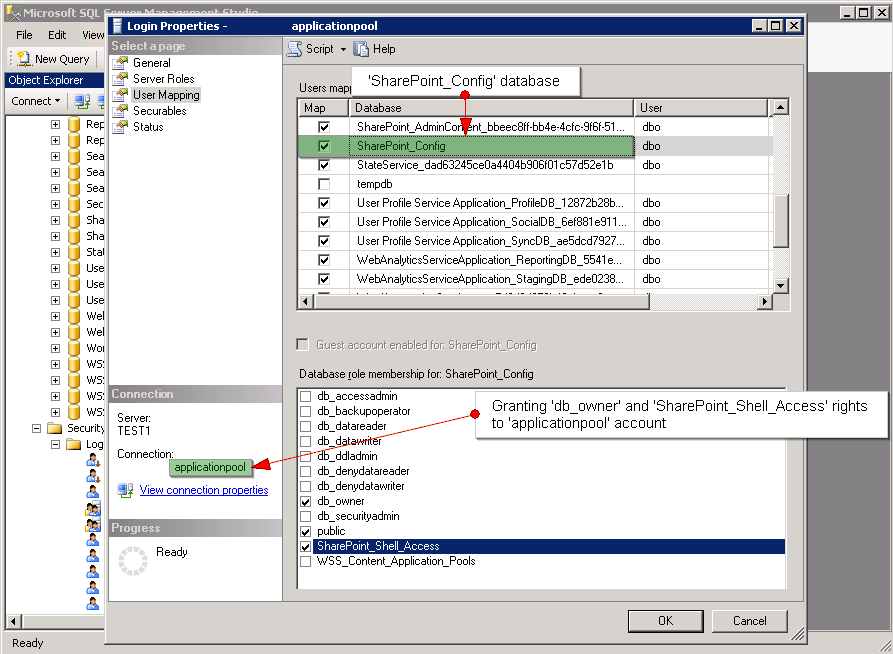
Granting rights to the user account


Very informative post! Thanks!
Hi\Hello I am having a problem seeing your sidebar on my ipad machine.
Just wanted you to know.
Thanks
@ Kiener: Thanks for pointing out the problem, I will look into the issue 🙂
SharePoint_Shell_Access is not necessary
Such a good view. Her should receive credit for it. Thanks
What’s Up, just stopping by to show some [holiday|seasonal|Christmas|Kwanza|winter} cheer! I certainly respect how hard it is blogging all this information! Have a GREAT NEW YEAR!
Thanks!
Great article. Keep it up
Nice share. Keep posting