Sharepoint hit counter web part

15 September, 2009 (11:26) | MOSS - Object Model | By: G Vijai Kumar

On 11th November, 2009 I have published the HitCounter webpart solution on to Codeplex
Hit Counter

Hit Counter

I have made the Hit Counter webpart very compact with minimum lines of code which generates user hits, before adding the webpart to the master page you need to create a Custom List name it as Statistics then create three columns in Statistics list as below:

  1. url Multiple lines of text
  2. date Single line of text
  3. uname Single line of text

Also, you have to give the Contribute – Can view, add, update, and delete permissions for the Visitor and Viewers for the Statistics list, so that visitor/viewers visits also recorded in the list.

To give permissions

  1. Go to Statistics list, Settings > List Settings
  2. Under Permissions and Management click on Permissions for this list
  3. Select Visitors checkbox then click on Actions > Edit User Permissions then select Contribute – Can view, add, update, and delete
  4. Finally click Ok button

Please Note: For applying Contribute – Can view, add, update, and delete permissions for Viewers repeat the above 1, 2, 3 and 4 steps

If a user is new to current page on the day, the code adds a record to Statistics list, if the same user visits the same page the code just returns out from condition and do nothing, because the user already visited the page on the same day, this is all because of to maintain the unique hits

To know the hit count for all pages in site, you have to place the webpart in master page, so that the webpart code runs on every page where the visitor go and makes the unique entry in Statistics list
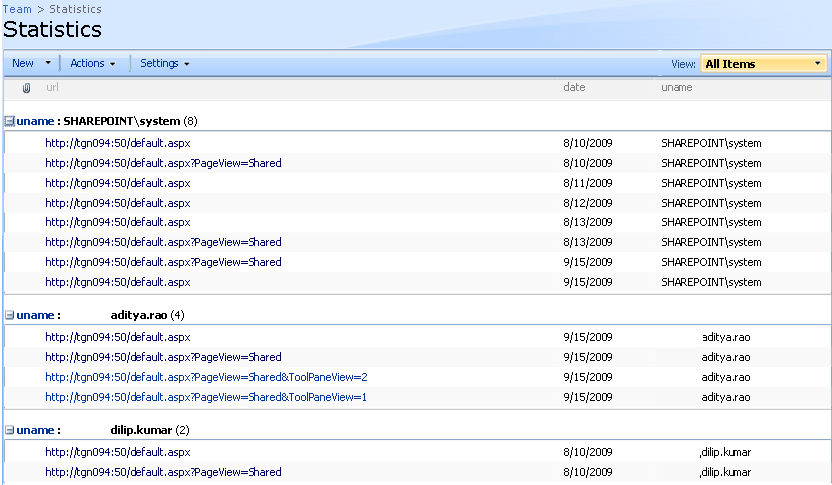
Statistics List

Statistics List

You can download the Hit Counter webpart from http://hitcounter.codeplex.com/

Comments on this solution are very much appreciated :-)

Thanks for looking into this

Comments

Comment from Kristopher
Time September 23, 2009 at 3:02 pm

What type of project did you create in Visual Studio? I initially assumed a Class Library but now am wondering if I should create it as a SharePoint Web Part…?

Comment from G Vijai Kumar
Time September 24, 2009 at 6:09 am

@ Kristopher: I choose webpart template and created the hit counter webpart, even I suggest the same, although there won’t be harm if you choose class library but you have to put additional effort in adding the reference (Microsoft.Sharepoint.dll)

Comment from Kristopher
Time September 24, 2009 at 2:13 pm

@ Admin: Thank you! I built this yesterday with your code using the Web Part project. This is a perfectly functional application immediately after deploying. I am building in functionality to check to see if a site already has the list created. If not, my code will create the list, create the columns, and set the permissions to Contribute when the web part is added to a page. Also, I removed the portion of the query that checks for only unique hits per day because the customer wanted it to behave like a FrontPage-style hit counter. Beautiful code and thank you for your service to the community (:

Comment from Charles
Time September 24, 2009 at 6:47 pm

@ admin
I am not a developer not do I have access to developer tools to even attempt making an application, I am more of a site admin with limited controls. Please forgive me if my question sounds technically naïve.
Would it be possible to use this web part to count the number of hits on anything, (documents, pages, wiki pages, ect ect) and save it within a list?
I would like to automatically count hits on items in libraries, and or lists. Is this possible?
Could you also recommend a good sharepoint users forum?

Thank you for your article!

Comment from G Vijai Kumar
Time September 25, 2009 at 5:27 am

@ Charles: The hit counter webpart records the user visits on pages, basically it works on Sharepoint pages whether it can be content pages, list/library pages etc. If you want to know hit counts on items in list/library please look into the thread http://social.technet.microsoft.com/Forums/en-US/sharepointdevelopment/thread/c66c1b27-8d2b-48ca-a1d8-e36565e27468
I would prefer Microsoft Technet forum is the best place for Sharepoint users, here you go http://social.technet.microsoft.com/Forums/en-US/category/sharepoint

Comment from Jayashri
Time September 28, 2009 at 12:24 pm

Hi,

First Of All Thanks for this code.
I tried it at my side, it works.But works only when this webpart gets added into a page.
Is it necessary to insert this webpart on all pages?
cant we have option such as if we copy DLL of this into bin, it should automatically fetch all pages hits of this site into a list?

Thanks in advance.

Comment from G Vijai Kumar
Time September 29, 2009 at 5:11 am

@ Jayashri, Thanks for looking into the post. No need of placing the webpart on all pages, as I mentioned already in the post that, to know the hit counts for all pages in a site, you have to place the webpart in master page (default.master) instead of content pages (default.aspx)
so that the webpart code runs on every page and makes the unique entry in ‘Statistics’ list, use Sharepoint designer to place hit counter webpart in master page, Good Luck :-)

Comment from Kristopher
Time September 29, 2009 at 11:29 am

@Jayashri: Good luck, indeed! I was not able to place a webpart on the Master Page using the GUI. Neither could I from SharePoint Designer.

Comment from Mike Lydiat
Time October 16, 2009 at 2:14 pm

As a total newbie to coding, I am looking for a hit / visitor counter .dwp file I can import to a SharePoint page without using Visual Basic or SharePoint Designer. Does one exist anywhere? I have Googled for days now unsuccessfully.

Mike

Comment from G Vijai Kumar
Time October 16, 2009 at 6:18 pm

@ Mike Lydiat: Send me your e-mail details through contact form on page http://www.fivenumber.com/contact/ so that I can send you the .wsp file by which you can easily install through single command

Comment from P LYNCH
Time October 26, 2009 at 9:45 am

Seems to be a few noobs like Mike and myself looking for a counter. I am a site admin and can ‘pseudo code’ in css and manipulate master pages in SPD. But cannot program in VS. I also do not have access to the 12 hive to implment a .wsp file. I’m trying to find out how to add a counter to my site in a webpart and your example look great, better than the web component counter in SPD. I wonder if I could create a sharepoint custom list like you (add columns above), and add the code above as a script in a CEWP, would this work for the one page I need this?

Or could I get a copy of the dwp file and edit the webpart code in notepad to work with my site?

Comment from G Vijai Kumar
Time October 26, 2009 at 6:59 pm

@ PLYNCH: Script doesn’t show the all time unique hits, there should be some code behind to insert items into list and calculate the item count of a particular user, you can use the third party utilities like http://www.statcounter.com script and place it in master page using SPD

Comment from Harsha vardhan
Time December 4, 2009 at 5:54 am

Hi
Please help me ..
I not able to add Hit count webpart in sharepoint master page.
Error in rendering the webpart.

Thanks
Vardhan

Comment from G Vijai Kumar
Time December 4, 2009 at 5:59 am

@Vardhan: The message ‘Error in rendering the webpart’ appears in Sharepoint designer or in IE while try to access the site?

Comment from Harsha Vardhan
Time December 4, 2009 at 12:35 pm

Hi Vijay

The message ‘Error in rendering the webpart’ shows when I try to add webpart in Sharepoint Designer.Could you please help me where i am going wrong.

Thanks
Vardhan

Comment from Harsha Vardhan
Time December 4, 2009 at 3:03 pm

The message ‘Error in rendering the webpart’ shows when I try to add webpart in Sharepoint Designer.Could you please help me where i am going wrong.

Comment from G Vijai Kumar
Time December 4, 2009 at 3:48 pm

@Vardhan: Have you created ‘Statistics’ list with columns as below:
1. url – Multiple lines of text
2. date – Single line of text
3. uname – Single line of text

Please confirm

Comment from Harsha vardhan
Time December 5, 2009 at 7:04 am

Hi vijay

Yes, I created statistics list with columns as given.
I downloaded wsp and deployed in site. I am able to get the Hitcounter webpart in default.aspx. The urls aslo enter the statistics list correctly.
After that I open the sharepoint designer and tried to add the Hit counter webpart to Master page. It is showing “Error in Rendering the Webpart object reference not set”. Even I added the tagprefix to master page aslo.

Could you Please Help me.

Thanks,
Vardhan

Comment from Harsha vardhan
Time December 5, 2009 at 7:11 am

Hi vijay

I tried Your Code Solution and deployed in Site. It works fine in default.aspx. when I tried to add the same Hit counter webpart in master page it also showing “Error in render webpart”.

Please help me as it was high priority requriement to me.

Thanks,
Vardhan

Pingback from Restrict SharePoint Designer usage as needed | PortalArabic – Arabic Shared Data
Time December 6, 2009 at 5:23 am

[...] Sharepoint hit counter web part Share [Translate] [...]

Pingback from Create Powerful Reusable Workflows | PortalArabic – Arabic Shared Data
Time December 6, 2009 at 5:31 am

[...] Sharepoint hit counter web part Share [Translate] [...]

Pingback from Create External Content Types using Business Connectivity Services | PortalArabic – Arabic Shared Data
Time December 6, 2009 at 11:30 am

[...] Sharepoint hit counter web part [...]

Pingback from Connect to Data Sources outside of SharePoint | PortalArabic – Arabic Shared Data
Time December 6, 2009 at 12:18 pm

[...] Sharepoint hit counter web part [...]

Pingback from Use XSLT List View web parts to show dynamic views of your data | PortalArabic – Arabic Shared Data
Time December 6, 2009 at 12:21 pm

[...] Sharepoint hit counter web part [...]

Pingback from Create Site Assets for your site | PortalArabic – Arabic Shared Data
Time December 6, 2009 at 12:26 pm

[...] Sharepoint hit counter web part [...]

Pingback from Create Content Types and attach to Lists directly | PortalArabic – Arabic Shared Data
Time December 6, 2009 at 12:27 pm

[...] Sharepoint hit counter web part [...]

Pingback from Configure Site Security | PortalArabic – Arabic Shared Data
Time December 6, 2009 at 12:29 pm

[...] Sharepoint hit counter web part [...]

Pingback from New User Experience with Summary Pages, Ribbon and Quick Launch navigation | PortalArabic – Arabic Shared Data
Time December 6, 2009 at 12:31 pm

[...] Sharepoint hit counter web part [...]

Comment from Ulrich Bernskov
Time January 14, 2010 at 2:18 pm

Hi Vijay
Thank you for sharing your component.
I am missing some kind of step to implement the functionality on a site. I have created a list with the 3 coloumns.
I have used the STSADM on the server and I can go in the backend and publish the solution to the webfrontend with success. I have also done an additional IISRESET just to be sure.

Then I assumed that I could see a new webpart in the GUI after using “Site Action” “Edit page” and then add webpart.
But I have a suspicion that I am missing something?
Should I edit the ‘default.aspx’ in SPD and if so – what should I do?

Comment from Ulrich Bernskov
Time January 14, 2010 at 2:29 pm

For some reason I managed to miss “… and activate the feature HitCounter”
Now I have the functionality.
thank you.

Comment from G Vijai Kumar
Time January 14, 2010 at 3:33 pm

@ Ulrich: Thanks for looking into the post, Good Luck :-)

Comment from Ulrich Bernskov
Time January 15, 2010 at 7:52 am

Well – next issue is the rights that needs to be on the “statistics” custom list. Maybe you should elaborate on this. I just got an access denied for ordinary users or visitors, because they cannot add (contribute) to the list.

Comment from G Vijai Kumar
Time January 15, 2010 at 9:03 am

@Ulrich: You have to give the “Contribute – Can view, add, update, and delete” permissions for the visitor for the ‘Statistics’ list, so that visitor visits also recorded in that particular list.
To give permissions: Go to Statistics list, Settings > List Settings, under ‘Permissions and Management ‘ click on ‘Permissions for this list’, select ‘Visitors ‘ checkbox then click on ‘Actions’ > ‘Edit User Permissions’ then select ‘Contribute – Can view, add, update, and delete’ click Ok button

Comment from Ulrich Bernskov
Time January 15, 2010 at 9:16 am

Indeed. But you should elaborate on this – maybe with a few screenshots in a installation doc on CodePlex. For future users ofcourse.

Comment from G Vijai Kumar
Time January 15, 2010 at 2:48 pm

@Ulrich: Done! update the instructions on Codeplex, thanks for your suggestions.

Comment from Ulrich Bernskov
Time January 15, 2010 at 3:02 pm

Excelent. The next request/wish would be some kind of trim to display the friendly name of the user. I get the hits in the DOMAIN\user format and would prefer something like “Firstname Lastname”

Another thing is that it appears that you use hardcoded date format. Not the system setting. In my case that gives MM/DD/YYYY as in your screencapture on Codeplex and we use DD/MM/YYYY

Comment from G Vijai Kumar
Time January 15, 2010 at 3:11 pm

@Ulrich: I have used Indian Date format (DD/MM/YYYY) for sure will definitely update the said suggestions in the next release of Hit Counter webpart, thank you.

Comment from Ryan Mendel
Time February 1, 2010 at 9:04 pm

Will this solution work with anonymous publishing sites (i.e. a MOSS public Internet site)?

Comment from G Vijai Kumar
Time February 2, 2010 at 5:49 am

@ Rayn Mendel: This solution won’t work for anonymous users, but I promise that, I will release a next version which works for anonymous users too

Comment from Chatfield
Time February 16, 2010 at 8:06 pm

The webpart will not even allow an anoymous user to laod the page, would be nice if a person could atleast allow the page to load- albeit not count the anonymous hit. Any way to change that for the time being?

Looking forward to counter working for ALL hits- anonymous included. Thanks!

Comment from Soumya
Time March 3, 2010 at 1:40 pm

Hi Vijay,

Can you please let me know how to create a webpart which track the number of users on a site prior to and after the current month. like username ,url visited,date,etc..

Thanks in advance,
Soumya

Comment from G Vijai Kumar
Time March 3, 2010 at 1:50 pm

@ Soumya: Hit Counter webpart available at Codeplex will meet your requirement, it shows user name, URL visited, date, total no.of hits etc, let me know in case if you need more details, thanks for looking into the post

Comment from G Vijai Kumar
Time March 3, 2010 at 2:04 pm

@ Chatfield: I have a thought to update the Hit Counter webpart which works for anonymous users too, but don’t know when I can release, for time being you can elevate the privileges for anonymous users and no hit counts for those users
try to incorporate the below lines of code in Hit Counter webpart solutions
//Elevate Privileges
SPSecurity.RunWithElevatedPrivileges(delegate()
{
SPSite mySite = SPControl.GetContextSite(Context);
});

Comment from Soumya
Time March 4, 2010 at 3:57 pm

Hi Vijay,

Thanks for your reply. Even I have tried the hitcounter web part available on codeplex . But there the details are storing in a list(named statistics). I have created a view to dispalythe details. I am getting username,date and the total count correctly.Only the Url is not getiing it properly.

The sitecollections and site visited, the url is always storing with (/Forms/AllItems.aspx) only.

Is there a way I can get

1. original site url visited (the exact url not the library url)

2. any html pages visited (which is stored inside the list)

Please help me and provide more details since I am new to sharepoint development :(

Thanks again for your help

Soumya

Comment from G Vijai Kumar
Time March 4, 2010 at 4:23 pm

@ Soumya: I guess you have placed the Hit Counter webpart in /Form/AllItems.aspx page (correct me if I am wrong) that’s why the counter is always adding the page (/Form/AllItems.aspx) in ‘Statistics’ lists.
You have to place the Hit Counter webpart in master page instead of content pages, so that the counter records the hits for all the site pages.
Note: Hit Counter webpart won’t count the hits of HTML pages, for that you have to choose some third party scripts or services.

Comment from Soumya
Time March 4, 2010 at 5:37 pm

You are correct vijay …

If I place the hit counter web part in master page it will show the count correctly (only I will get the count). But if I want to show the details (username, url, date visited), I need to create a view for the list. (Because it’s storing all the information in the list ["Statistics"] only.)

How can I get the information also in the same web part.

Just to make sure we both are in the same page; provided the URL I have followed http://hitcounter.codeplex.com/ . If not please provide me the correct URL.

Very much appreciated your help.

Thanks,
Soumya

Comment from G Vijai Kumar
Time March 5, 2010 at 5:56 am

@ Soumya: You can pull the list data using CAML query from Statistics list and show the details (username, url, date) as you want
Example:

                SPSite mysite = new SPSite("http://");
                SPWeb myweb = mysite.OpenWeb();
                SPList mylist = myweb.Lists["Statistics"];
                SPQuery myquery = new SPQuery();
                myquery.Query = "";//your query here.....
                SPListItemCollection myitemcol = mylist.GetItems(myquery);                

                foreach (SPListItem li in myitemcol)
                {
                    string url = li["url"].ToString();
                    string date = li["date"].ToString();
                    string username=li["uname"].ToString();
		}

Comment from Soumya
Time March 8, 2010 at 10:01 am

Thanks vijay. Thanks for yor help.

Comment from Ahmed Jewahar
Time March 16, 2010 at 6:33 am

I have deployed the solution as per below and also created a Statistics List with columns advised.
stsadm -o addsolution -filename HitCounter.wsp

However, when I try to add Hitcounter webpart to site or page, getting following error !!. Any idea ?

Unable to add selected web part(s). The file you imported is not valid. Verify that the file is a Web Part description file (*.webpart or *.dwp) and that it contains well-formed XML.

Comment from Jusuf
Time April 21, 2010 at 6:59 am

Hello Vijay,

i’m interested with your web part,
i have a need to create Hit Counter web Part, but it will be attached to a Button.

my needs :
in sharepoint page, i have a button.
if the button got clicked, it will be adding to a custom list :

Comment from Jusuf
Time April 21, 2010 at 7:06 am

Hello Vijay,

i’m interested with your web part,
i have a need to create Hit Counter web Part, but it will be attached to a Button.

my needs :
in sharepoint page, i have a button.
if the button got clicked, it will be adding to a custom list, whichis contain : currentDate (date), clickedCounter (int),
than, the button will open new IE /redirect the user to another page, eq : http://www.fiveNumber.com

so, from that custom list data, i can make a report :
for this month, xx user has been click the button
and also i can create a daily report.
01.01.2010 – 11 clicked
02.01.2010 – 21 clicked
…..
….

i already try to download your sharing code,
but i can not open it with VS 2005 or VS 2008. (the project type is not supported).
can you help me..

gladly if you want to help / give hint how to create webpart that fullfill my needs.

thanks…

Comment from G Vijai Kumar
Time April 26, 2010 at 9:42 am

@ Jusufjk: You can place the entire code in button eg:

void Button_Click(object sender, EventArgs e)
{
//Place the entire code here what ever is in the render method
}
But, why you want to place the hit counter code in a button, if you place the entire code in a button then how you are going to count the user hits, because if you place the entire code in a button the code will execute only when the button is click event is fired hence you cannot get the actual user hits for the pages, so I to get the actual user visit counts you have to run the code when the every time when the page gets loaded instead of in a button click, I am not sure how is your requirement, but consider this as my suggestion, let me know more clearer in case if you are looking for any thing.
Since you are unable to open the solution in VS 2005/2008, better you download a fresh copy from source code from http://hitcounter.codeplex.com/ then open visual studio 2005 Start > Programs > Microsoft Visual Studio 2005 then click on Microsoft Visual Studio 2005
Then, click on File > Open > Project/Solution
browse to HitCounter.sln file select and click Open

Comment from Ulrich Bernskov
Time June 4, 2010 at 7:19 am

If I place the webpart on a new “web part page” I get this error

The “HitCounter” Web Part appears to be causing a problem. Value does not fall within the expected range.

It works fine on http://web/subsite/default.aspx
It fails on http://web/subsite/webpartpage.aspx

I have not altered the default.master

Comment from Ulrich Bernskov
Time June 4, 2010 at 10:17 am

I just realized that the failing page was in fact in http://web/subsite/subsite2/webpartpage.aspx so after creating another “Statistics” list in that /subsite/subsite2 it worked fine.

Comment from Raj Mehta
Time June 25, 2010 at 7:01 pm

Vijay – I’ve deployed your web part solution and it seems to be working just fine. However, i am looking for something that counts the clicks when a link is clicked. For example, i have an Announcement that has some message followed by a link. I ‘d like to be able to count the hits on that link.

Any suggestion? Thanks for your help in advance.

Comment from Carol
Time June 29, 2010 at 8:03 am

Thank you so much for this… :)

Comment from Jusuf
Time July 14, 2010 at 9:03 am

Hi Vijay,

the purpose i’m willing to put the code into the button is :
i can count, how many user will be redirect from my Sharepoint system to another url http page.
and those url http page, wasn’t on sharepoint.

is there any way to check, how much user go from my sharepoint page ?

Comment from Mej
Time August 5, 2010 at 6:00 pm

Hi

Does hit counter web part can be used to count the hits on the document library items ?

Thanks
Mej

Comment from Revathy
Time August 11, 2010 at 6:53 am

hi vijay,can i able to access ur web part in sharepoint 2010. i need to get the number of views per item in asset library of sharepoint 2010. can ur web part help me?

Comment from G Vijai Kumar
Time August 11, 2010 at 1:53 pm

@ Revathy: Since SP2010 requires 64 bit assembly, it is always recommended that to re-compile the WSS/MOSS custom solutions for SP 2010.
Hit counter webpart doesn’t show item visit count, to know about the list/library item count you have to query using SPAuditQuery then you will get the item collection in SPAuditEntryCollection loop through each SPAuditEntry in the SPAuditEntryCollection where you can meet your requirement to know the item view, Good Luck

Comment from G Vijai Kumar
Time August 11, 2010 at 1:58 pm

@Mej: Hit counter webpart doesn’t show item visit count, to know about the list/library item count you have to query using SPAuditQuery then you will get the item collection in SPAuditEntryCollection loop through each SPAuditEntry in the SPAuditEntryCollection where you can meet your requirement to know the item view

Comment from G Vijai Kumar
Time August 11, 2010 at 2:11 pm

@ Raj mehta:To know about the list/library item count you have to query using SPAuditQuery then you will get the item collection in SPAuditEntryCollection loop through each SPAuditEntry in the SPAuditEntryCollection where you can meet your requirement to know the item view

Comment from Rizwan
Time August 17, 2010 at 9:38 am

Hi Vijay,

Its a superb code, Thanks.

Is it possible to change the look and feel of this webpart?
Thanks in advance.

Comment from G Vijai Kumar
Time August 21, 2010 at 7:23 am

@ Rizwan: Yes, you can apply your own styles for change the look and feel.

Comment from Raj Mehta
Time August 25, 2010 at 9:56 pm

Vijai – Thanks for your reply. But, i am looking to count hits on a link that points to an audio clip. As i explained previously, that link would be part of an announcement. So, users read it and then click on the link to listen to the audio.

Any thoughts?
Thanks!

Comment from Tim Raines
Time November 12, 2010 at 7:24 pm

Vijay, I have SharePoint 2007 in a BPOS (hosted environment). I am trying to use your webpart but I do not have stsadm. Do you have explicit instructions on how to install it using SP Designer or VS Studio 2007? I have created the custom list “Statistics” and added the three columns. I downloaded the .wsp file but could not do anything with it.

Comment from G Vijai Kumar
Time November 15, 2010 at 8:11 am

@ Tim Raines: Thanks for looking into the post and showing interest on the Hit Counter WebPart.
A .dwp file is a simple XML file which contains property settings for a single Web Part, we can upload the .dwp if we have, but before we have make sure that the webpart assembly is under site bin directory or installed in GAC, then after necessary safe control entries should be registered in web.config file, so only .dwp file won’t helps for ALL the custom webparts.
Let me know if you need more information.

Comment from Yusuf
Time December 2, 2010 at 11:28 am

Could you please help with a step by step procedure on how to add the webpart in sharepoint designer

Comment from vijaidev
Time December 4, 2010 at 8:16 pm

hi vijay
its good thanks a lot
can u pls create hitcounter which works for anonymous user for publishing websites

Comment from G Vijai Kumar
Time December 8, 2010 at 9:56 am

@ Yusuf: Open SharePoint in SharePoint designer, open up the appropriate master page from _catalogs click into the code view to select where exactly you want to place the webpart, then go to Insert > SharePoint Controls and click on Webpart… then you can see the WebPart pane on the right side select the Hit Counter webpart and click on Insert Selected WebPart button
Let me know if you need more information, Good Luck :-)

Comment from G Vijai Kumar
Time December 8, 2010 at 9:58 am

@ Vijaidev: If you set the permissions to the Statistics list for anonymous users then it is solved.

Comment from srishaila
Time December 8, 2010 at 11:15 am

Hello Sir,
Thank for the reply.
Can u please tell me how to attach survey to paticular document library in sharepoint 2007.
Thanks In Advance.

Comment from yusuf
Time December 9, 2010 at 9:02 pm

Thanks for your kind response, i have done exactly what you said it worked, but when i navigate to a different site i get error on the site

Comment from koti
Time December 12, 2010 at 7:46 am

Hi vijai kumar
this is koti i have a proublem with no of hits count
in download.aspx page i have a field .i.e.total download,another page downloadspecificpage.aspx there is a button .i.e.click to download .so when user clicks on that click to download button the count will be display in Download.aspx page.please send me the solution

Comment from koti
Time December 13, 2010 at 1:33 am

Hi vijay,
please help me
i want no of hits count,in download.aspx page i have a field i.e.Total Download ,in another Page Downloadspecificpage.aspx there is a button i.e. Click to Download,when user click the TITLE in Download.aspx page it navigates to Downloadspecificpage.aspx then he clicks the Click to Download button then the count will be display in the Total Download Field in Download.aspx page
please its very need full for me

Comment from BrightSky
Time December 13, 2010 at 9:46 pm

Hello Vijai,
Thank you for this free hit counter – this is exactly what I need for my current project. But I’m having an error message when trying to add the hit counter web part (see below) – wondering whether you would be able to suggest me how I can get around this?

“One or more field types are not installed properly. Go to the list settings page to delete these fields” (I’ve posted detailed error message in the Codeplex issue tracker page http://hitcounter.codeplex.com/workitem/19295).

I really appreciate you looking into this. Many thanks in advanced!

Comment from G Vijai Kumar
Time December 15, 2010 at 7:41 pm

@ Koti: I have add the new post on download count of document, please have a look into the post http://www.fivenumber.com/sharepoint-document-counter-counts-the-document-downloads/ and let me know if you require anything else, good luck :-)

Comment from G Vijai Kumar
Time December 15, 2010 at 7:44 pm

@ BrightSky: Seems that there is some problem with the fields in the list, can you re-create the Statistics list as per the instructed here http://hitcounter.codeplex.com/ and let me know if you need anything else, Good Luck :-)

Comment from G Vijai Kumar
Time December 15, 2010 at 7:51 pm

@Srishaila: Sorry for the late reponse, I believe this is not the right place to post a question, but I can suggest you to put the same question on MSDN forums
Pre-SharePoint question go here http://social.technet.microsoft.com/Forums/en-US/category/sharepoint
SharePoint 2010 question go here http://social.technet.microsoft.com/Forums/en-US/category/sharepoint2010
Thanks for contacting

Comment from Enrique
Time March 23, 2011 at 7:23 pm

Hi Vijai,

Great post,thank you for sharing.
I’m unable to modify your project, and I believe it’s because of my Visual Studio version, which is Premium.
Do you know if this is a problem?

Thanks,

Regards.

Comment from subha
Time April 8, 2011 at 11:47 am

Hi vijay,

Can i get this webpart work for anonymous users. My requirment is very specific with anonymous users .
i hav to count the no of times the page is opened by users.

Please help me out.

Regards,
Subha

Comment from G Vijai Kumar
Time May 12, 2011 at 8:48 am

@ Subha: Yes, you can execute the code with anonymous users too before that you have to put the code in Runwithelevatedprivileges block, let me know if you need more info.

Comment from Lynne
Time July 22, 2011 at 7:07 pm

Hi Vijay!

Your Webpart is exactly what Ive been searching for!

I havent been able to get it to work properly in the Masterpage though. Am I to add the list to the masterpage too? I cant seem to figure out how to make that (adding a list to a MP) work…

Comment from Charles
Time August 24, 2011 at 12:32 pm

Hi Vijai,
If we put the web part in the home page, will the subsite statistics be shown in the statistics page? . Also, the “Statistics” list is to be created only in the Home page,right?
Also if the user sign in to the page on different sessions,the count will not be increased,correct me if iam wrong.How can we handle the hit count.I intend to get the traffic in all the pages including subsites.Say the same user may use the page in the morning and at night,which should make a change in the hit count.I used the normal hit count control from sharepoint designer,but it increases the count for even a simple refresh.

Please help me out Vijai.

Thanks
Charles

Write a comment