A quick look on Sharepoint object model programs

24 September, 2009 (13:11) | MOSS - Object Model, MOSS - Quick Look | By: G Vijai Kumar

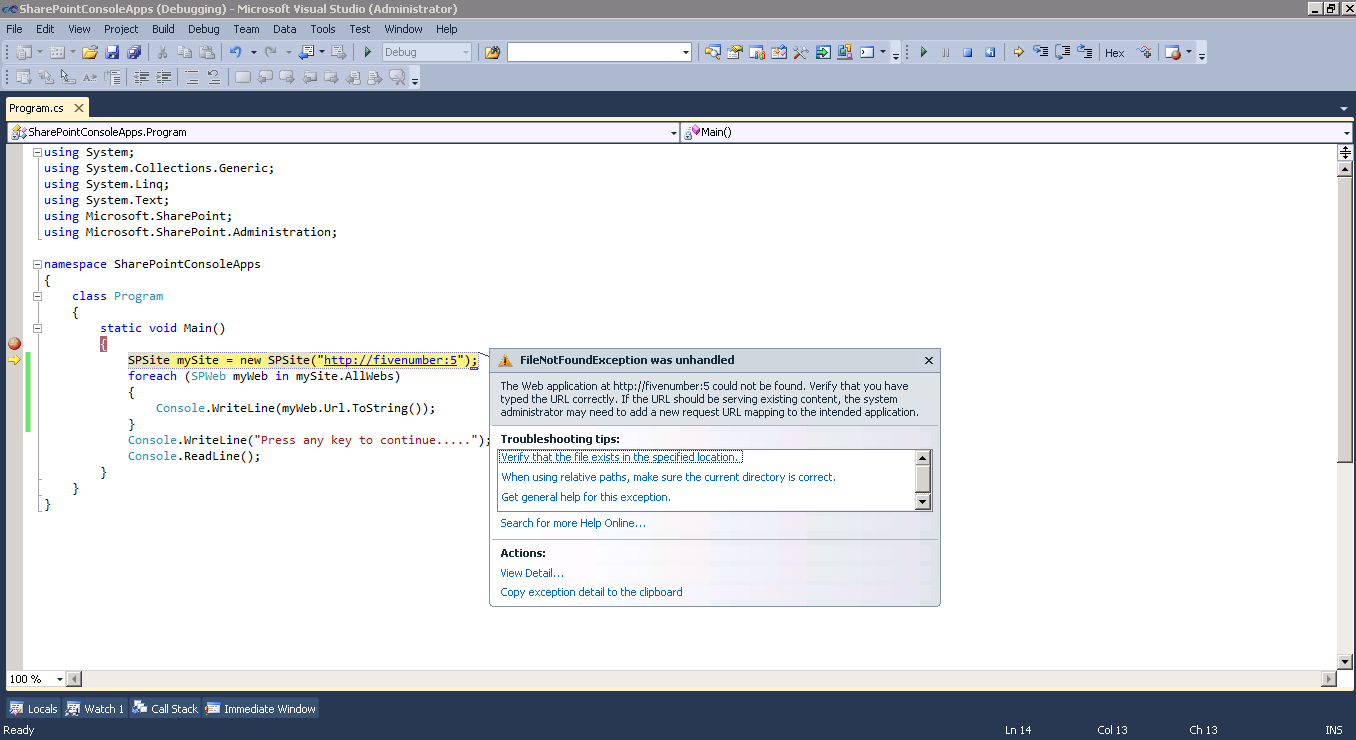
Here I am going to show you that the actions which we perform normally with UI, those also can be done programmatically, the same thing I am going to show in this post, this post is mainly targeted for beginners those who are new to Sharepoint object model, a quick watch on programs to create sub sites, lists, showing web apps etc.
Creating Sub Site:

static void Main(string[] args)
{
SPSite mySite = new SPSite("http://servername:port");
SPWeb myWeb = mySite.OpenWeb();
SPWebCollection myWebCol = myWeb.Webs;
SPWeb mynewweb = myWebCol.Add("Web url", "Web Title", "Web Description", 1033, "STS#0", false, false);
Console.WriteLine("Press any key to continue.....");
Console.ReadLine();
}

Creating List:

static void Main(string[] args)
{
SPSite mySite = new SPSite("http://servername:port");
SPWeb myWeb = mySite.OpenWeb();
myWeb.Lists.Add("My New List", "My new list description", myWeb.ListTemplates["Custom List"]);
SPList newList = myWeb.Lists["My New List"];
newList.OnQuickLaunch = true;
newList.Update();
Console.WriteLine("Press any key to continue.....");
Console.ReadLine();
}

Show all top-level sites in a farm

static void Main()        
 {
 foreach (SPWebApplication myWebApp in SPWebService.ContentService.WebApplications)
 {
 foreach (SPSite mySiteCol in myWebApp.Sites)
 {
 try
 {
 Console.WriteLine(mySiteCol.Url);
 }
 catch (Exception e)
 {
 Console.WriteLine(e);
 }                   
 }
 }
 Console.WriteLine("Press any key to continue.....");
 Console.ReadLine();
 }

Show all site collection in web application:

static void Main(string[] args)
{
SPSite mySite = new SPSite("http://servername:port");
SPWebApplication myWebApp = mySite.WebApplication;
SPSiteCollection mySiteCol = myWebApp.Sites;
foreach (SPSite SingleSite in mySiteCol)
{
Console.WriteLine(SingleSite.Url.ToString());
}
Console.WriteLine("Press any key to continue.....");
Console.ReadLine();
}

Show all subsites in site collection:

static void Main(string[] args)
{
SPSite mySite = new SPSite("http://servername:port");
foreach (SPWeb myWeb in mySite.AllWebs)
{
Console.WriteLine(myWeb.Url.ToString());
}
Console.WriteLine("Press any key to continue.....");
Console.ReadLine();
}

Show all Roles in a site:

static void Main(string[] args)
{
SPSite mySite = new SPSite("http://servername:port");
SPWeb myWeb = mySite.OpenWeb();
foreach (SPRoleDefinition myRoleDef in myWeb.RoleDefinitions)
{
Console.WriteLine(myRoleDef.Name);
}
Console.WriteLine("Press any key to continue.....");
Console.ReadLine();
}

Show all Alerts in a site:

static void Main(string[] args)
{
SPSite mySite = new SPSite("http://servername:port");
SPWeb myWeb = mySite.OpenWeb();
foreach (SPAlert myAlerts in myWeb.Alerts)
{
Console.WriteLine(myAlerts.Title);
}
Console.WriteLine("Press any key to continue.....");
Console.ReadLine();
}

Show all Lists in a site:

static void Main(string[] args)
{
SPSite mySite = new SPSite("http://servername:port");
SPWeb myWeb = mySite.OpenWeb();
foreach (SPList myList in myWeb.Lists)
{
Console.WriteLine(myList.Title.ToString());
}
Console.WriteLine("Press any key to continue.....");
Console.ReadLine();
}

Show all List Templates in a site:

static void Main(string[] args)
{
SPSite mySite = new SPSite("http://servername:port");
SPWeb myWeb = mySite.OpenWeb();
foreach (SPListTemplate myListTemplate in myWeb.ListTemplates)
{
Console.WriteLine(myListTemplate.Name);
}
Console.WriteLine("Press any key to continue.....");
Console.ReadLine();
}

Show all Fields in a List:

static void Main(string[] args)
{
SPSite mySite = new SPSite("http://servername:port");
SPWeb myWeb = mySite.OpenWeb();
SPList myList = myWeb.Lists["List Name"];
foreach (SPField myField in myList.Fields)
{
Console.WriteLine(myField.InternalName);
}
Console.WriteLine("Press any key to continue.....");
Console.ReadLine();
}

Show all Items in a List column:

static void Main(string[] args)
{
SPSite mySite = new SPSite("http://servername:port");
SPWeb myWeb = mySite.OpenWeb();
SPList myList = myWeb.Lists["List Name"];
SPQuery myQuery = new SPQuery();
myQuery.Query = "";//Your Query
SPListItemCollection myItemCol = myList.GetItems(myQuery);
foreach (SPListItem myListItem in myItemCol)
{
Console.WriteLine(myListItem["Column Name"].ToString());
}
Console.WriteLine("Press any key to continue.....");
Console.ReadLine();
}

Delete all Items from a list:

static void Main(string[] args)
{
SPSite mySite = new SPSite("http://servername:port");
SPWeb myWeb = mySite.OpenWeb();
SPList myList=myWeb.Lists["List Name"];
myWeb.AllowUnsafeUpdates = true;
int count = 1;
for (int i = 0; i < myList.ItemCount; i++)
{
SPListItem myListitem = myList.Items[0];
myListitem.Delete();
Console.WriteLine(count + " item(s) deleted");
count++;
}
myWeb.AllowUnsafeUpdates = false;
Console.WriteLine("Press any key to continue.....");
Console.ReadLine();
}

Show all Groups in a site:

static void Main(string[] args)
{
SPSite mySite = new SPSite("http://servername:port");
SPWeb myWeb = mySite.OpenWeb();
foreach (SPGroup myGroup in myWeb.Groups)
{
Console.WriteLine(myGroup.Name);
}
Console.WriteLine("Press any key to continue.....");
Console.ReadLine();
}

Show all Users in a group:

static void Main(string[] args)
{
SPSite mySite = new SPSite("http://servername:port");
SPWeb myWeb = mySite.OpenWeb();
SPGroup myGroup = myWeb.Groups["Group Name"];
foreach (SPUser myUser in myGroup.Users)
{
Console.WriteLine(myUser.Name);
}
Console.WriteLine("Press any key to continue.....");
Console.ReadLine();
}

Sharepoint hit counter web part

15 September, 2009 (11:26) | MOSS - Object Model | By: G Vijai Kumar

On 11th November, 2009 I have published the HitCounter webpart solution on to Codeplex

You can download the Hit Counter webpart from http://hitcounter.codeplex.com/

Comments on this solution are very much appreciated :-)

Thanks for looking into this

Copy Sharepoint list items from one site to another programmatically

25 August, 2009 (06:13) | MOSS - Object Model | By: G Vijai Kumar

In my earlier post, I have show you how to Copy items from one list to another, using Sharepoint designer workflow now we learn how to copy list items from one Sharepoint site to another site programmatically

Before executing the code I have created two Sharepoint sites, first is http://fivenumber:5/ and the second http://fivenumber:50/

I have also created custom list in each site, Source List in site http://fivenumber:5/ and Desitination List in http://fivenumber:50/

Here in this scenario I have chosen Console Application template because it doens’t contains any input fields to show as webpart and also to avoid GAC registration, safe controls etc., I felt it will be easy to execute the code in Console.

Download complete source code

Source List

Source List

Copied List Items

Copied List Items

Destination List

Destination List

using System;
using System.Collections.Generic;
using System.Text;

using Microsoft.SharePoint;

namespace CopyListItems
{
    class Program
    {
        static void Main(string[] args)
        {
            try
            {
                SPSite mySourceSite = new SPSite("http://fivenumber:5/");
                SPWeb mySourceWeb = mySourceSite.OpenWeb();
                SPList mySourceList = mySourceWeb.Lists["Source List"];
                SPQuery mySourceListQuery = new SPQuery();
                mySourceListQuery.Query = "" +
                                "" +
                                "" +
                                "" +
                                "";
                SPListItemCollection mySourceItemColl = mySourceList.GetItems(mySourceListQuery);
                int count = 0;
                foreach (SPListItem mySourceListItem in mySourceItemColl)
                {
                    string SourceEmpId = mySourceListItem["Employee Id"].ToString();
                    string SourceEmpName = mySourceListItem["Employee Name"].ToString();
                    string SourceDesig = mySourceListItem["Designation"].ToString();
                    string SourceAge = mySourceListItem["Age"].ToString();

                    SPSite myDestinationSite = new SPSite("http://fivenumber:50");
                    SPWeb myDestinationWeb = myDestinationSite.OpenWeb();
                    SPList myDestinationList = myDestinationWeb.Lists["Destination List"];
                    SPListItem myDestinationListItem = myDestinationList.Items.Add();

                    myDestinationListItem["Employee Id"] = SourceEmpId;
                    myDestinationListItem["Employee Name"] = SourceEmpName;
                    myDestinationListItem["Designation"] = SourceDesig;
                    myDestinationListItem["Age"] = SourceAge;
                    myDestinationWeb.AllowUnsafeUpdates = true;
                    myDestinationListItem.Update();
                    myDestinationWeb.AllowUnsafeUpdates = false;
                    count++;
                    Console.WriteLine(count+" item(s) copied");
                }
                Console.WriteLine("Press enter to continue");
                Console.ReadLine();
            }
            catch (Exception ex)
            {
                Console.Write(ex);
                Console.WriteLine("Press enter to continue");
                Console.ReadLine();
            }
        }
    }
}

If you have Lookup column in your Source List and want to copy the same data in to Destination List, you have to create an instance for SPFieldLookupValue class like below…..

Let’s suppose ‘Employee Name’ column is lookup field, comment or remove the line # 29 in the above code and replace with below code snippet

SPFieldLookupValue mySourceLookupEmpName = new SPFieldLookupValue(mySourceListItem["Employee Name"].ToString());
string SourceEmpName = mySourceLookupEmpName.LookupId.ToString();

Export SPGridView to Excel spreadsheet in Sharepoint 2007

28 July, 2009 (08:38) | MOSS - Object Model | By: G Vijai Kumar

In my last post I have show you how to retrieve current user profile in Sharepoint 2007, before that I have also posted on how to display custom list items in SPGridView

Today I am going to work on how to export SPGridView items into Excel spreadsheet in Sharepoint 2007

Most of the code I have used form Matt Berseth blog article Export GridView to Excel so thanks to Matt and also thanks to my colleague Ram Gowri who helped me on this

Download complete source code

To run the code first you need to create a custom list, name it as Countries, then create two columns int he same list Country and State

Sharepoint OOB custom list

Sharepoint OOB custom list

Displaying Sharepoint custom list items into SPGridView

Displaying Sharepoint custom list items into SPGridView

Exporting SPGridView to Excel Spreadsheet

Exporting SPGridView to Excel Spreadsheet

After exporting SPGridView items in to Excel spreadsheet

After exporting SPGridView items in to Excel spreadsheet

using System;
using System.IO;
using System.Web;
using System.Runtime.InteropServices;
using System.Web.UI;
using System.Web.UI.WebControls.WebParts;
using System.Xml.Serialization;
using System.Web.UI.WebControls;

using Microsoft.SharePoint;
using Microsoft.SharePoint.WebControls;
using Microsoft.SharePoint.WebPartPages;

namespace ExportGridtoExcel
{
    [Guid("2fa65763-1ef1-4173-8a77-685e840f0196")]
    public class ExportGridtoExcel : System.Web.UI.WebControls.WebParts.WebPart
    {
        SPGridView myGridView;
        SPDataSource myDataSource = new SPDataSource();
        Button oBtn_Export;

        protected override void CreateChildControls()
        {
            oBtn_Export = new Button();
            oBtn_Export.Text = "Export to Excel";
            oBtn_Export.CssClass = "ButtonHeightWidth";
            oBtn_Export.Click += new EventHandler(oBtn_Export_Click);
            this.Controls.Add(oBtn_Export);

            myGridView = new SPGridView();
            myGridView.Enabled = true;
            myGridView.AutoGenerateColumns = false;                       

            SPBoundField colTitle = new SPBoundField();
            colTitle.DataField = "Country";
            colTitle.HeaderText = "Country";
            this.myGridView.Columns.Add(colTitle);

            SPBoundField colMission = new SPBoundField();
            colMission.DataField = "State";
            colMission.HeaderText = "State";
            this.myGridView.Columns.Add(colMission);

            this.Controls.Add(myGridView);
        }

        void oBtn_Export_Click(object sender, EventArgs e)
        {
            ExportToExcel("CountryState.xls", myGridView);
        }

        protected override void OnPreRender(EventArgs e)
        {
            base.OnPreRender(e);
            SPSite mySite = SPContext.Current.Site;
            SPWeb myWeb = SPContext.Current.Web;
            SPList list = myWeb.Lists["Countries"];
            myDataSource.List = list;
            myGridView.DataSource = myDataSource;
            myGridView.DataBind();
        }

        public static void ExportToExcel(string strFileName, SPGridView gv)
        {
            using (StringWriter sw = new StringWriter())
            {
                using (HtmlTextWriter htw = new HtmlTextWriter(sw))
                {
                    //  Create a form to contain the grid
                    Table table = new Table();

                    //  add the header row to the table
                    if (gv.HeaderRow != null)
                    {
                        PrepareControlForExport(gv.HeaderRow);
                        table.Rows.Add(gv.HeaderRow);
                    }

                    //  add each of the data rows to the table
                    foreach (GridViewRow row in gv.Rows)
                    {
                        PrepareControlForExport(row);
                        table.Rows.Add(row);
                    }

                    //  add the footer row to the table
                    if (gv.FooterRow != null)
                    {
                        PrepareControlForExport(gv.FooterRow);
                        table.Rows.Add(gv.FooterRow);
                    }

                    //  render the table into the htmlwriter
                    table.RenderControl(htw);

                    HttpContext.Current.Response.Clear();
                    HttpContext.Current.Response.AddHeader("content-disposition", string.Format("attachment; filename={0}", strFileName));
                    HttpContext.Current.Response.ContentType = "application/ms-excel";
                    HttpContext.Current.Response.Cache.SetCacheability(HttpCacheability.NoCache);
                    //render the htmlwriter into the response
                    HttpContext.Current.Response.Write(sw.ToString());
                    HttpContext.Current.Response.End();
                }
            }
        }

        private static void PrepareControlForExport(Control control)
        {
            for (int i = 0; i < control.Controls.Count; i++)
            {
                Control current = control.Controls[i];
                if (current is LinkButton)
                {
                    control.Controls.Remove(current);
                    control.Controls.AddAt(i, new LiteralControl((current as LinkButton).Text));
                }
                else if (current is ImageButton)
                {
                    control.Controls.Remove(current);
                    control.Controls.AddAt(i, new LiteralControl((current as ImageButton).AlternateText));
                }
                else if (current is HyperLink)
                {
                    control.Controls.Remove(current);
                    control.Controls.AddAt(i, new LiteralControl((current as HyperLink).Text));
                }
                else if (current is DropDownList)
                {
                    control.Controls.Remove(current);
                    control.Controls.AddAt(i, new LiteralControl((current as DropDownList).SelectedItem.Text));
                }
                else if (current is CheckBox)
                {
                    control.Controls.Remove(current);
                    control.Controls.AddAt(i, new LiteralControl((current as CheckBox).Checked ? "True" : "False"));
                }

                if (current.HasControls())
                {
                    PrepareControlForExport(current);
                }
            }
        }
    }
}


Retrieve current user profile in Sharepoint 2007

27 July, 2009 (10:12) | MOSS - Object Model | By: G Vijai Kumar

My last post was about Contact / Feedback webpart for Sharepoint 2007

In this post I am going to show you how to retrieve current user profile and show the properties like Title, First name, Last Name etc.
using Microsoft.Office.Server.UserProfiles.UserProfileManager()

It is a collection of user profile objects used to access user profile data we need to just call the UserProfileManager() class to access a specific user profile

Here I am going to do the same

Retrieve user profile

Retrieve user profile

Download complete source code


using System;
using System.Runtime.InteropServices;
using System.Web.UI;
using System.Web.UI.WebControls.WebParts;
using System.Xml.Serialization;
using System.Web.UI.WebControls;

using Microsoft.Office.Server;
using Microsoft.Office.Server.Administration;
using Microsoft.Office.Server.UserProfiles;

using Microsoft.SharePoint;
using Microsoft.SharePoint.WebControls;
using Microsoft.SharePoint.WebPartPages;

namespace RetrieveUserProfile
{
    [Guid("b95130c6-6bc0-4ce3-8596-778af2321354")]
    public class RetrieveUserProfile : System.Web.UI.WebControls.WebParts.WebPart
    {
        Label oLabelTitle;
        Label oLabelFirstName;
        Label oLabelLastname;
        Label oLabelAboutMe;
        Label oLabelDept;
        Label oLabelSipAdd;
        Label oLabelWorkPhone;
        Label oLabelWorkEmail;
        Label oLabelWebsite;
        Label oLabelResponsibility;

        Label oLabelMessage;

        protected override void CreateChildControls()
        {
            base.CreateChildControls();           

            //Label for Retrieving user profiles
            oLabelTitle = new Label();
            this.Controls.Add(oLabelTitle);

            oLabelFirstName = new Label();
            this.Controls.Add(oLabelFirstName);

            oLabelLastname = new Label();
            this.Controls.Add(oLabelLastname);

            oLabelAboutMe = new Label();
            this.Controls.Add(oLabelAboutMe);

            oLabelDept = new Label();
            this.Controls.Add(oLabelDept);

            oLabelSipAdd = new Label();
            this.Controls.Add(oLabelSipAdd);

            oLabelWorkPhone = new Label();
            this.Controls.Add(oLabelWorkPhone);

            oLabelWorkEmail = new Label();
            this.Controls.Add(oLabelWorkEmail);

            oLabelWebsite = new Label();
            this.Controls.Add(oLabelWebsite);

            oLabelResponsibility = new Label();
            this.Controls.Add(oLabelResponsibility);

            oLabelMessage = new Label();
            this.Controls.Add(oLabelMessage);
        }

        protected override void Render(System.Web.UI.HtmlTextWriter writer)
        {
            SPSecurity.RunWithElevatedPrivileges(delegate()
            {
            try
            {
                SPSite mySite = SPControl.GetContextSite(Context);
                SPWeb myWeb = SPControl.GetContextWeb(Context);
                ServerContext context = ServerContext.GetContext(mySite);
                UserProfileManager myProfileManager = new UserProfileManager(context);
                string CurrentUser = SPContext.Current.Web.CurrentUser.LoginName;
                UserProfile myProfile = myProfileManager.GetUserProfile(CurrentUser);
                if (myProfile[PropertyConstants.Title].Value != null)
                {
                    oLabelTitle.Text = myProfile[PropertyConstants.Title].Value.ToString();
                }
                if (myProfile[PropertyConstants.FirstName].Value != null)
                {
                    oLabelFirstName.Text = myProfile[PropertyConstants.FirstName].Value.ToString();
                }
                if (myProfile[PropertyConstants.LastName].Value != null)
                {
                    oLabelLastname.Text = myProfile[PropertyConstants.LastName].Value.ToString();
                }
                if (myProfile[PropertyConstants.AboutMe].Value != null)
                {
                    oLabelAboutMe.Text = myProfile[PropertyConstants.AboutMe].Value.ToString();
                }
                if (myProfile[PropertyConstants.Department].Value != null)
                {
                    oLabelDept.Text = myProfile[PropertyConstants.Department].Value.ToString();
                }
                if (myProfile[PropertyConstants.SipAddress].Value != null)
                {
                    oLabelSipAdd.Text = myProfile[PropertyConstants.SipAddress].Value.ToString();
                }
                if (myProfile[PropertyConstants.WorkPhone].Value != null)
                {
                    oLabelWorkPhone.Text = myProfile[PropertyConstants.WorkPhone].Value.ToString();
                }
                if (myProfile[PropertyConstants.WorkEmail].Value != null)
                {
                    oLabelWorkEmail.Text = myProfile[PropertyConstants.WorkEmail].Value.ToString();
                }
                if (myProfile[PropertyConstants.WebSite].Value != null)
                {
                    oLabelWebsite.Text = myProfile[PropertyConstants.WebSite].Value.ToString();
                }
                if (myProfile[PropertyConstants.Responsibility].Value != null)
                {
                    oLabelResponsibility.Text = myProfile[PropertyConstants.Responsibility].Value.ToString();
                }
            }
            catch (UserNotFoundException ex)
            {
                oLabelMessage.Text = ex.ToString();
            }
            });